![brioHR-logo-color.svg]](https://support.briohr.com/hubfs/brioHR-logo-color.svg)
Introduction
At BrioHR, we are committed to continuously enhancing the user experience. We listen to valuable feedback from our clients to deliver new features, improvements, and system enhancements.
This article provides a summary of all BrioHR product updates released in Week 2 of July 2026.
Global HR Update
Import Employee Fixed Remunerations and Deductions in Bulk
Admin users can now efficiently update fixed remunerations and deductions for multiple employees at once using the Bulk Import/Export feature, ensuring streamlined data management and consistency for companies with high headcounts.
What's new?
- Download a unified template to easily add new fixed remunerations or deductions in bulk.
- Update existing compensation items seamlessly.
- Manage fix remunerations and deductions details for multiple employees, such as Effective Date, Amount, Currency, and Payroll Cycle, all in a single spreadsheet.
👉 Refer to this article to learn more about this feature
View Years of Service in Employee Profiles & Reports
Years of Service is now available in both the Employee Profile and Employee Information Report, making it easier to view an employee's length of service at a glance. What's new?
- View an employee's Years of Service directly from the Job History tab in the Employee Profile.
- Include Years of Service as part of any Report from Report Builder that has Employment Details.
- The Years of Service filter can be specific to year, month, and days.
👉 Refer to this article to learn more about this feature
Manage Multiple Subsidiaries with Ease
Switching between company accounts is now simpler than ever.
With the latest enhancement to the brioHR Mobile App, users with access to multiple subsidiary accounts can now switch between their assigned subsidiaries directly from the Account tab—without having to log out and log back in.
What's New?
-
Seamlessly switch between your accessible subsidiary accounts.
- Return to your main branch anytime with a single tap.
- Save time by eliminating the need to repeatedly log in and out.
- Only subsidiaries you have permission to access will be displayed for a secure and streamlined experience.
Whether you're managing multiple companies or supporting employees across subsidiaries, this enhancement makes navigating between accounts faster and more convenient while you're on the go.
📲Update your brioHR Mobile App to start using this feature today!
👉 Learn more about this feature here
Expense Claims Module Update
Gain Better Visibility into Employee Expense Claims
Keeping track of employee claim balances just got easier.
Introducing the Expense Claims Balance Report—a new report designed to give HR teams a complete view of employees' expense claim entitlements, helping you monitor claim utilisation and available balances with greater accuracy.
What's New?
- View claim balances at a glanceSee each employee's claim limit, amount used, and remaining balance in a single report.
- Generate accurate balancesCalculate claim balances based on your selected effective date using transaction dates for more accurate reporting.
- Filter the data you needGenerate reports by department, claim policy, and claim type to quickly find the information that matters.
- Break down claim utilisation
Analyse claim balances by Year, Month, or Transaction for better visibility. - Export with ease
Download your reports in CSV, Excel, or PDF formats for auditing, reconciliation, or further analysis.
👉 Refer to this article to learn more about this feature
Claim Group Filter Added for Efficient Claim Processing
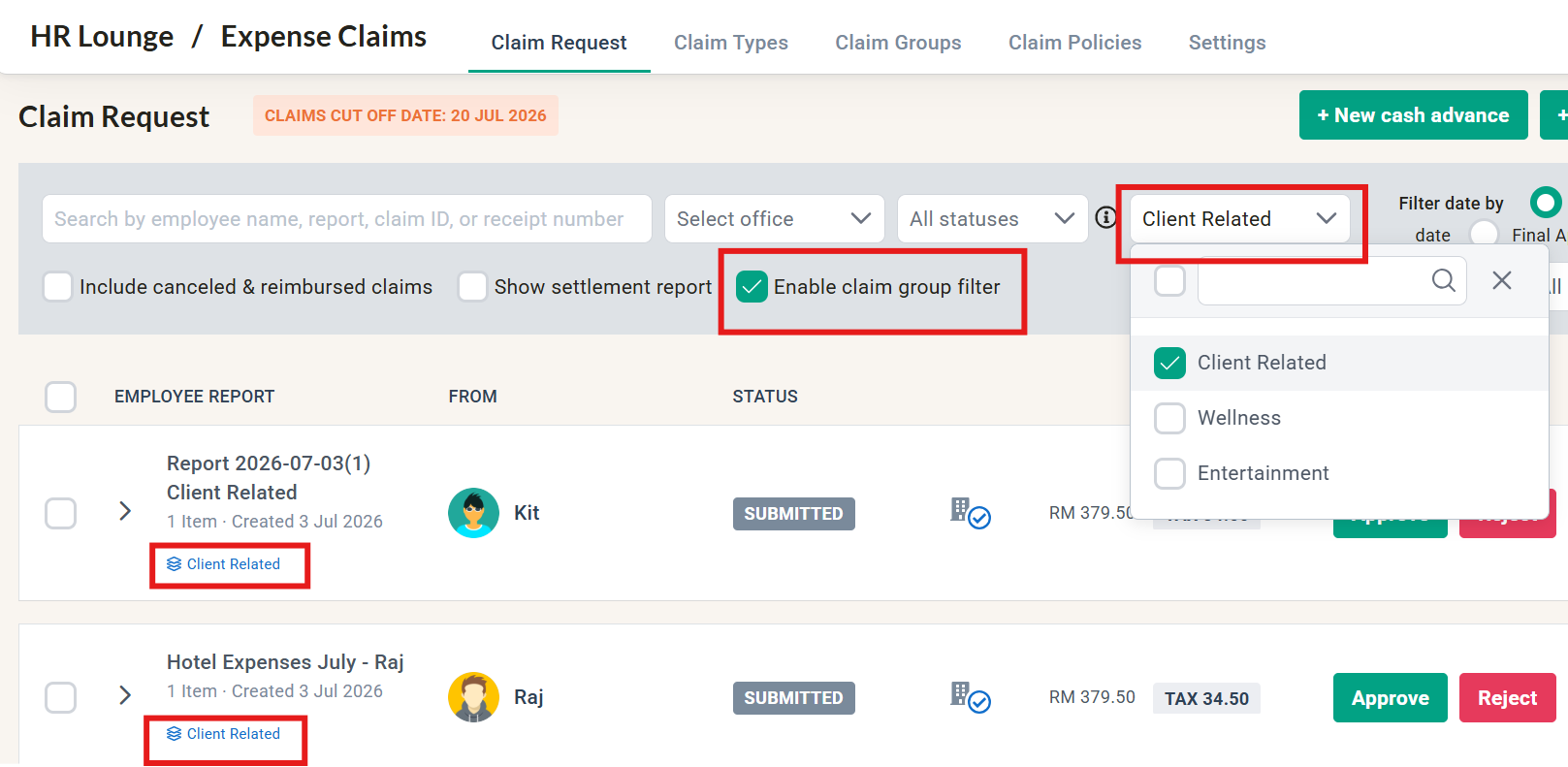
We've updated the Claim Request page in the Expense Claims Module to include a new Claim Group Filter. This allows admins and claim managers to easily organize and handle claims based on specific groups, making your overall workflow much faster.
What's new?
- Filter and view claims by specific claim groups directly on the Claim Request page.
- Identify which group a report belongs to at a glance with new Claim Group tags displayed under claim report names.
- Manage and process employee expense claims more efficiently with a cleaner, more targeted view.
Time Attendance Module Update
Employee Overtime Approval (Post OT Request) available on Mobile App!
Employees can now conveniently request overtime approval directly via the Time Attendance module in the brioHR mobile app, using the new Post OT submission feature.
To ensure this feature works as intended, please note the following:
- First enable Post OT submission for your attendance policy.
- It is available for employees using Daily Overtime Calculation only.
- Requests can only be submitted for actual overtime worked on past dates, up to the number of hours recorded, and while the timesheet is still Open.
👉Read more about the steps to enable this feature within the policy here
👉Follow this step-by-step guide to request overtime as an employee here
Payroll Module (Malaysia) Update
New Bank File Version for CIMB Bank Berhad
We've added a new bank file version for CIMB Bank Berhad that supports payroll disbursement via Touch 'n Go, making your digital payment distribution more flexible.
What's new?
- Select the new CIMB Bank file option directly within the Payroll module setup.
- Disburse salaries seamlessly to your employees' Touch 'n Go accounts.
👉Read this article on how to set up CIMB Bank Berhad in the Payroll module
Note:
Current banks supporting Touch n' Go account disbursement -
- Malayan Bank Berhad
- CIMB Bank Berhad
Contact brioHR support via email or live chat to check if this e-wallet disbursement feature can be done for your specific bank.