![brioHR-logo-color.svg]](https://support.briohr.com/hubfs/brioHR-logo-color.svg)
Audience & Scope
Audience: All users
Module: Account Settings
Country: Global
Pre-requisites: Multi-Factor Authentication feature enabled in the system
To improve both security and user convenience, we are introducing an enhancement to Multi-Factor Authentication (MFA) that allows users to remember trusted devices for 30 days.
Previously, users with MFA enabled were required to enter a One-Time Password (OTP) every time they logged in, even when accessing the system from the same browser or device. With this enhancement, users can now choose to trust their current browser or device after successfully verifying their OTP.
What’s New?
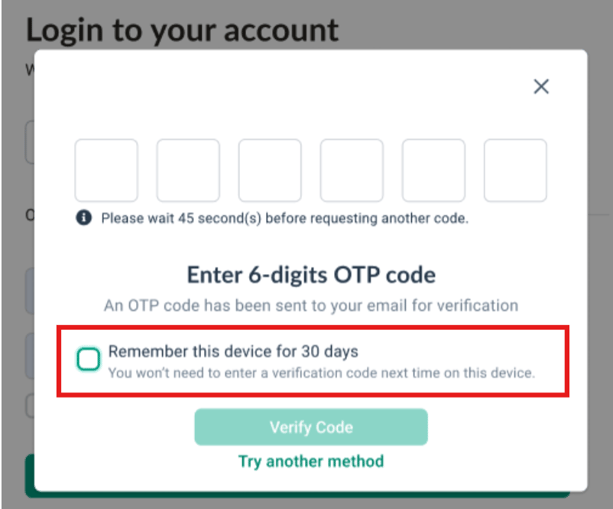
A new option will now appear during MFA verification:
“Remember this device for 30 days”
When selected, the system will recognize the current browser or device as trusted, allowing users to skip OTP verification on future logins for the next 30 days.
This enhancement helps streamline the login experience while maintaining strong account protection.
How It Works
If the option is checked:
After a successful OTP verification:
- The current browser or device will be marked as trusted
- OTP verification will be skipped for future logins on the same environment
- Trust remains valid for 30 days
If the option is unchecked:
The existing MFA behavior remains unchanged:
- Users will continue to enter an OTP during every login
Trusted Device Identification
Trusted environments are identified differently depending on the platform:
Web Login
- Browser-based trust using secure cookies
Mobile Login
- Device-based trust using device tokens
Security Rules & Logic
To ensure account security is maintained:
- A device is only trusted after successful OTP verification
- Trusted access is valid for 30 days by default
- MFA protection continues to apply for unrecognized or changed environments
When MFA Will Still Be Required
Users will still be prompted for OTP verification in the following situations:
- Logging in from a new browser or device
- Browser cookies have been cleared (web login)
- Mobile app has been reinstalled or device token becomes invalid
- The 30-day trust period has expired
- The user resets their password
Frequently Asked Questions (FAQ)
Q: What does “Remember this device for 30 days” mean?
A: This option allows users to mark their current browser or mobile device as trusted after successfully completing MFA verification. Once trusted, users can log in without entering an OTP again for the next 30 days on the same device or browser.
Q: Will MFA be completely disabled when I select this option?
A: No. MFA is only skipped on the trusted browser or device for 30 days. MFA will still be required when logging in from a new or unrecognized device, after the trust period expires, or when certain security conditions are triggered.
Q: What happens if I clear my browser cookies or reinstall the mobile app?
A: The trusted device status will be removed. Users will need to complete OTP verification again to re-establish trust for that browser or device.
Q: Can users choose not to remember a device?
A: Yes. The “Remember this device for 30 days” option is optional. If users do not select it, the existing MFA behavior remains unchanged and OTP verification will be required on every login.
Q: In what situations will users still be prompted for MFA?
A: Users will still need to enter an OTP when:
- Logging in from a new browser or device
- Browser cookies are cleared
- The mobile app is reinstalled or device token changes
- The 30-day trusted period expires
- The user resets their password
Related Article
Multi-Factor Authentication (MFA): Enhanced Security for BrioHR Accounts
Ownership
By: Arveena