![brioHR-logo-color.svg]](https://support.briohr.com/hubfs/brioHR-logo-color.svg)
Audience & Scope
Audience: HR Admin
Module: Payroll
Country: Malaysia
Pre-requisites: Admin User group settings enabled, assigned as Payroll Manager
What is Form E?
Form E is an annual employer declaration submitted to LHDN. It acts as a cover letter, summarising key employee information for the selected payroll year, including:
- Total number of employees
- Number of new joiners
- Number of employees who ceased employment
Understanding Key Fields in Form E
Two important fields that often require validation are:
- A1: Number of Employees as of 31st December
This includes the number of employees who are active in the system as of 31st December - A3: Number of New Employees
This includes employees whose start date falls between 1 January and 31 December of the selected payroll year. - A4: Number of Employees Who Ceased Employment
This includes employees whose end date falls within the same period (1 January to 31 December).
Accurate reporting in these fields is essential, as discrepancies may lead to submission issues or additional clarification requests from LHDN.
New Feature: Download Detailed Employee Reports for A1, A3 & A4
To make verification easier and reduce manual checking, a new enhancement has been introduced.
You can now download a detailed report that shows exactly which employees are included in the fields A1, A3 and A4.
How to Download the Report
To test or use this feature, follow these steps below:
- Login to BrioHR
- Go into the Payroll module
- Select the Payroll center
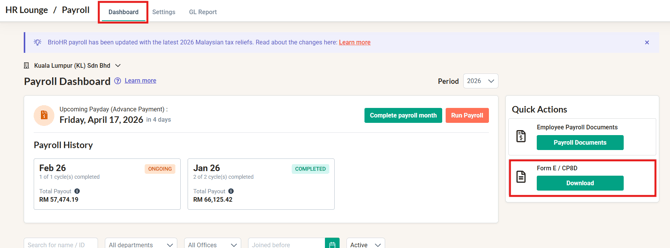
- Look for Quick Actions on the Payroll Dashboard
- Click Download on Form E / CP8D
- Scroll down to the Form E section
- Click Download for the report required
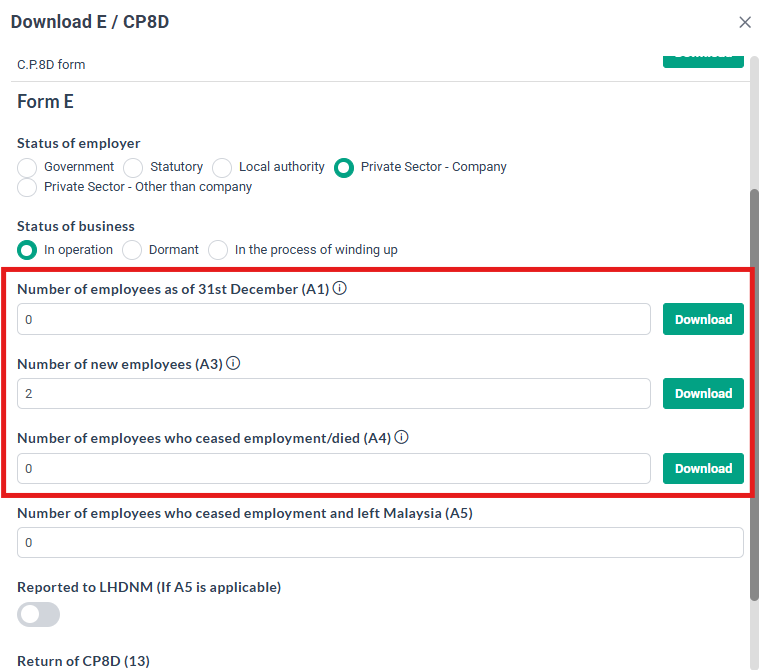
This report allows you to:
- Determine number of employees as of 31st December (A1)
- Identify employees classified as new joiners (A3)
- Review employees marked as ceased (A4)
- Quickly troubleshoot discrepancies before submission
Why This Enhancement Matters
This new reporting feature provides greater transparency and control over your Form E submission by:
- Reducing manual effort in validating employee counts
- Minimising reporting errors
- Helping ensure compliance with LHDN requirements
With clearer visibility into how A1, A3 and A4 figures are calculated, you can submit your Form E with greater confidence.
Frequently Asked Questions (FAQ)
Q: What is the purpose of Form E?
A: Form E is an annual declaration submitted to LHDN that summarises employee information and acts as a cover document for tax reporting.
Q: How does the new report help?
A: The downloadable report shows exactly which employees are counted in A3 and A4, making it easier to verify and troubleshoot discrepancies.
Q: Can I filter the report?
A: Yes, the report can be generated based on a specific payroll year and payroll center.
Related Articles
1. How to Prepare for Tax Filing in Malaysia
Ownership
By: Arveena