![brioHR-logo-color.svg]](https://support.briohr.com/hubfs/brioHR-logo-color.svg)
Audience & Scope
Audience: HR Admin
Module: Payroll
Country: Malaysia
Pre-requisites: Payroll Manager access to Payroll Center settings
Step 1: Bank Account Setup
- Hover over HR Lounge and click into the Payroll module
- Click into the Payroll Center
- Go to Settings, scroll down to the Bank Account section, and in the "Bank Account" field, select United Overseas Bank (Malaysia) Berhad.
- Enter the required information in the provided fields
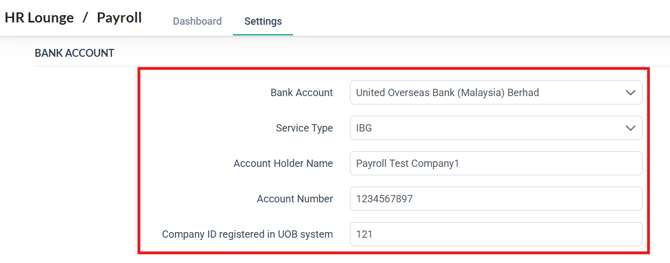
- Click Save at the bottom of the Settings page to complete the setup.
NOTE:
To successfully download the bank file with complete information, ensure all required fields are filled out.
Step 2: Downloading The Bank File
- In the Payroll Dashboard, click on the COMPLETED payroll month for which you want to process payments.
- At the Bank File section, click on the button to Download
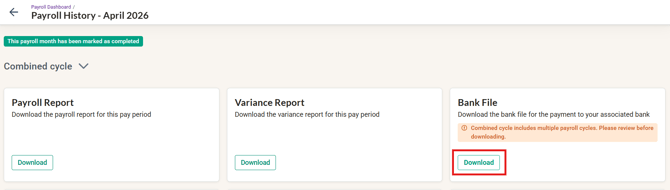
- In the "Generate bank file for United Overseas Bank (Malaysia) Berhad" pop-up window:
- Select the bank file type.
- Select the employee(s).
- Click Generate to download the file.
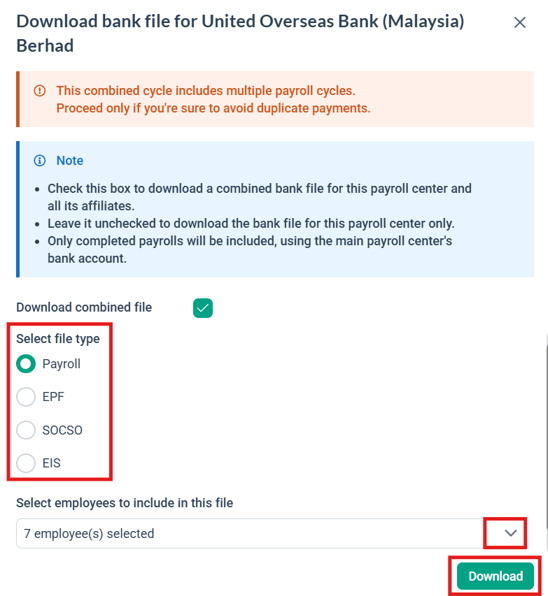
- After downloading the bank file, upload it to the bank's portal to process the payment.
IMPORTANT:
If any information is missing, you won’t be able to generate the bank file. A warning prompt will appear (refer to the screenshot below).
In this case, enter the missing information and try generating the bank file again.

Ownership
By: Arveena