![brioHR-logo-color.svg]](https://support.briohr.com/hubfs/brioHR-logo-color.svg)
Creating a Payroll Center in BrioHR allows you to manage country-specific payroll processes with accuracy and compliance. For Malaysia, this ensures payroll calculations, reports, and contributions are aligned with local regulations.
Payroll Centers also help you keep payroll data organized and ensure only authorized payroll managers can access the relevant center.
Note: Only users with Admin Settings access can create or edit Payroll Centers.
Step-by-Step Guide to Create a Payroll Center (Malaysia)
1. Login to BrioHR and click into Settings > Payroll Centers
2. Click on +Add Payroll Center.
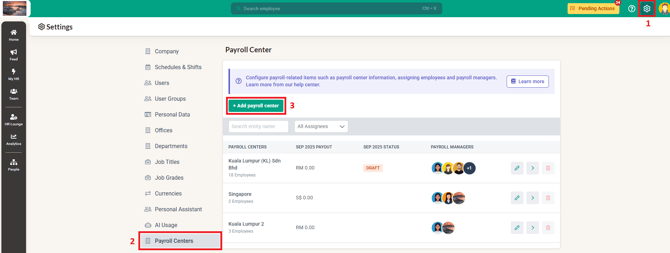
3. Complete the required fields in the form.
4. In the Countries field, select Malaysia.
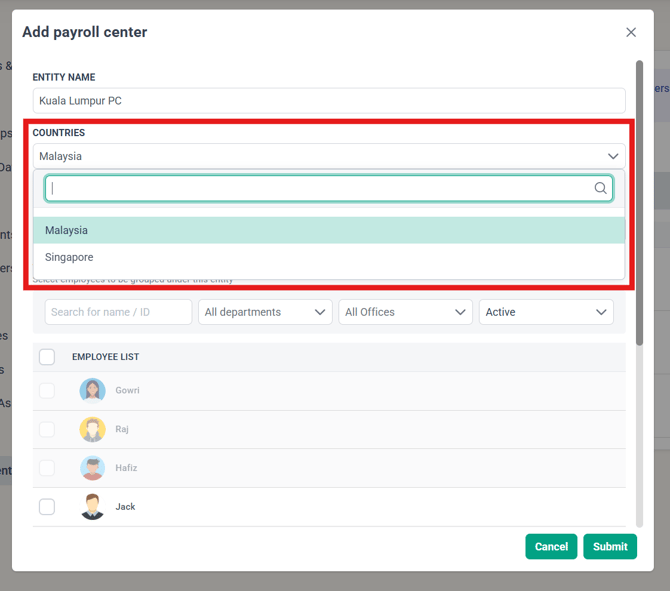
5. Review the details and click Submit to create the Payroll Center.
IMPORTANT:
Payroll centers only affect the Payroll module. It does not separate your employees for other modules. Leave, Claims, Time Attendance, Onboarding, Training, Recruitment, Performance, and Timesheets modules cannot be separated per payroll center as independent entities:
For Leave, Expense Claims, and Time Attendance: You can create multiple Policies with different eligibility and approval workflows — but this is not a hard entity split like payroll centers.
For Performance: All employees share the same performance cycle. Separate cycles per payroll center are not supported.
Frequently Asked Questions (FAQs)
1. Who can create a Payroll Center in BrioHR?
Only users with Admin Settings access have permission to create or edit Payroll Centers.
2. Can I create multiple Payroll Centers for different countries?
Yes, you can create multiple Payroll Centers, BrioHR currently supports Malaysia and Singapore payroll.
3. Can Payroll Centers be edited after creation?
Yes, Payroll Centers can be updated anytime from the Settings menu.
4. Why is it important to select the correct country when creating a Payroll Center?
Selecting the correct country ensures payroll calculations, statutory contributions, and reports comply with local laws (e.g., CPF in Singapore, EPF in Malaysia).
Need Assistance?
If you have any questions or require assistance, please reach out to our support team via live chat or email us at support@briohr.com.