![brioHR-logo-color.svg]](https://support.briohr.com/hubfs/brioHR-logo-color.svg)
Introduction
Credit leave is a leave type where employees must first request credit (number of days) before applying it as leave.
An example of credit leave is a Replacement leave.
For example, if you are required to work on a public holiday (e.g., 31 August 2025), your manager may grant you a replacement leave (also known as off-in-lieu leave) to compensate for that day.
When requesting credit leave, you must specify a Reference Date. This date indicates when the credit becomes effective and usually corresponds to the date you worked as a replacement.
IMPORTANT:
By default, approved credit days can only be used on or after the reference date. For instance, if the reference date is 31 August 2025, the leave credit cannot be applied before this date.
However, if the permission to utilize credits on the same day as the reference date has been enabled, you will be able to do so. For example, Birthday Leave Credit - Credit requested using the reference date 31st August 2025. Once the credit is approved, the credit can be utilized on the same date - 31st August 2025.
Step-by-Step Guide: Request for Credit Leave (eg, Replacement leave, or Off-in-lieu leave)
Step 1 - Access the Request Credit Leave Section
There are two ways to access the Request Credit Leave page:
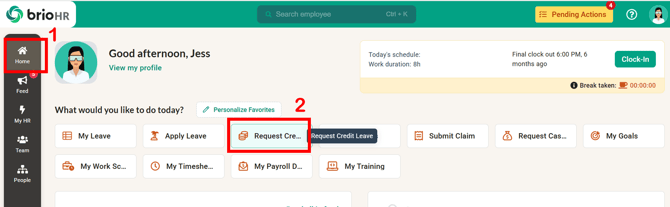
Method 1: From the Home page.
1. Go to Home.
2. Click Request Credit Leave.
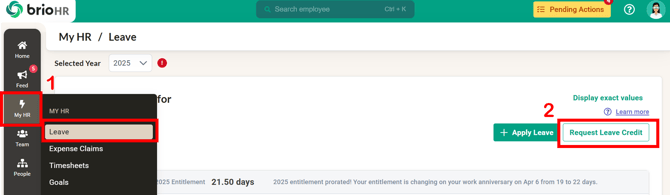
Method 2: From your leave dashboard.
1. Go to My HR > Click Leave.
2. Click the Request Leave Credit button.
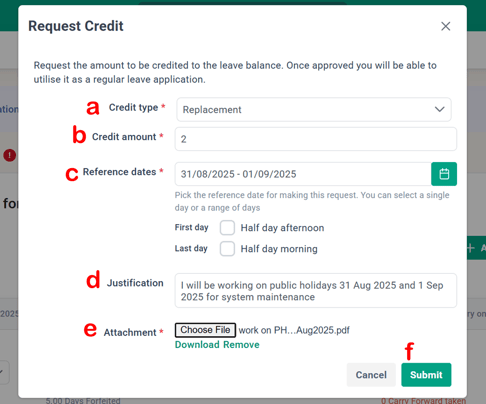
Step 2 - Submit a Credit Leave Request
a. Choose Credit Type: Select from available types (e.g., Replacement Leave)
b. Add Credit Amount: Enter the number of days to be credited.
c. Select Reference Date(s):
-
Single Day: Credit becomes valid from the chosen date and can be used on or after this date.
-
Range of Days: Credit validity starts after the last selected date in the range.
NOTE:
Make sure to choose the correct Reference Date.
d. Justification: Add a note explaining why you are requesting credit leave.
e. Attachment: If required (marked with a red asterisk), upload supporting documents.
f. Submit: Click Submit to send your request for approval.
Step 3 - Viewing Credit Leave Request History
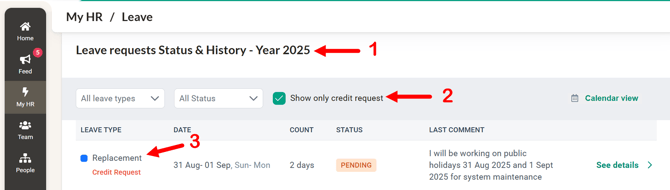
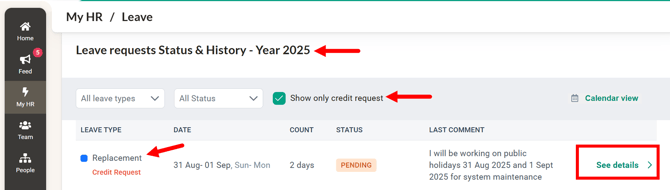
1. On the Leave Dashboard > Search for Leave Requests Status & History table
2. Filter by selecting Show Only Credit Request
3. The credit leave request history will appear with 'Credit Request' label
How to Check Credited Leave and Availability
View Leave Credit Summary
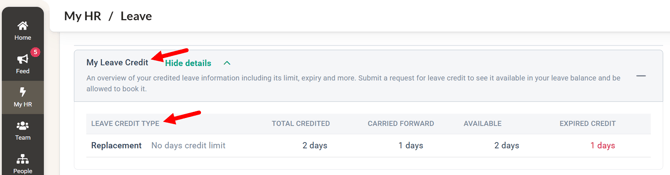
Go to your Leave Dashboard and locate the table My Leave Credit. You will see:
-
Total Credited
-
Carried Forward (from last year)
-
Available Balance (approved credits)
-
Expired Credit
NOTE:
The expiry date of the credit is based on the reference date selected during Credit Request submission, combined with the validity period set in the leave policy. The expiry date cannot be edited directly: to change an approved credit's expiry, cancel (or ask HR to reopen) the existing credit request and submit a new one with the correct Reference Date — the system generates the new expiry from it.
For HR/Admin: the policy-level validity is configured in HR Lounge > Leave > Leave Types & Policies > Replacement Leave > [policy] > General Configuration > CREDIT > Set expiry for the credit.
View Detailed Credit Leave Records
-
In the Leave Requests Status & History section, select the checkbox Show only credit request to filter results.
-
Click See Details to view request history, including credit amount and expiry period.
Frequently Asked Questions (FAQ)
Q1: What is the difference between credit leave and normal leave?
A: Normal leave types' entitlement days (e.g., annual leave) are automatically allocated, while credit leave entitlement days (e.g., replacement leave) requires request approval before it can be used.
Q2: Can I used credit amount before the credit reference date?
A: No. The credit amount approved can only be used on or after the reference date specified in your request.
Q3: How do I know if my credit request is approved?
A: You can check the Leave Requests Status & History section in your Leave Dashboard to see the approval status.
Q4: What happens if my credit leave expires?
A: Expired credits cannot be used. Make sure to monitor expiry dates in the My Leave Credit section.
Q5: What do i do? My credits are not appearing in my leave dashboard.
A: Be sure to check that the credits have not yet expired or already utilised. Only active and available credits can be utilized for leave submission.
Q6: My Annual Leave is finished — can Emergency Leave be deducted from my Replacement Leave instead?
A: No — Emergency Leave is linked to Annual Leave, so deductions only apply against the Annual Leave balance. Alternatives, depending on your company's policy: HR can enable a Tolerance Amount on the policy (the AL balance goes negative up to the tolerance), or submit a Replacement Leave application instead.