![brioHR-logo-color.svg]](https://support.briohr.com/hubfs/brioHR-logo-color.svg)
We’re excited to introduce the new and enhanced version of our Onboarding module, designed to deliver superior performance and a smoother user experience.
If you're an existing subscriber using the current Onboarding module, this guide will help you transition to the new version seamlessly.
Important Update:
-
From 23rd October 2025, you will no longer be able to add new joiners in the old Onboarding module.
-
All new joiners after 23rd October 2025 will use the new Onboarding module.
-
The old Onboarding module will be fully retired by December 2025.
- Action buttons in the module, such as 'Start', 'Set Roles', 'Reset Onboarding', 'Complete Onboarding', and the 'Send' button for Chat will no longer be available.
- The 'View Detail' pop-up will only show Profile details for read-only purposes.
Understanding the Versions
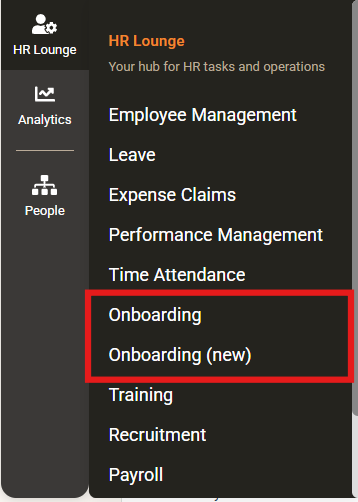
When you log in to BrioHR and navigate to the HR Lounge dashboard, you’ll see two versions of the Onboarding module: "Onboarding" and "Onboarding (new)." Here’s what each version represents:
- Onboarding: The previous version, containing all your existing data, records, and any current joiners.
- Onboarding (new): The updated version, pending the setup of Onboarding processes and ready for new joiners.
Getting Started with the New Version
Q: How do I start using the new version of the Onboarding module?
To begin using the new version, you’ll need to set up your onboarding processes. Follow these steps:
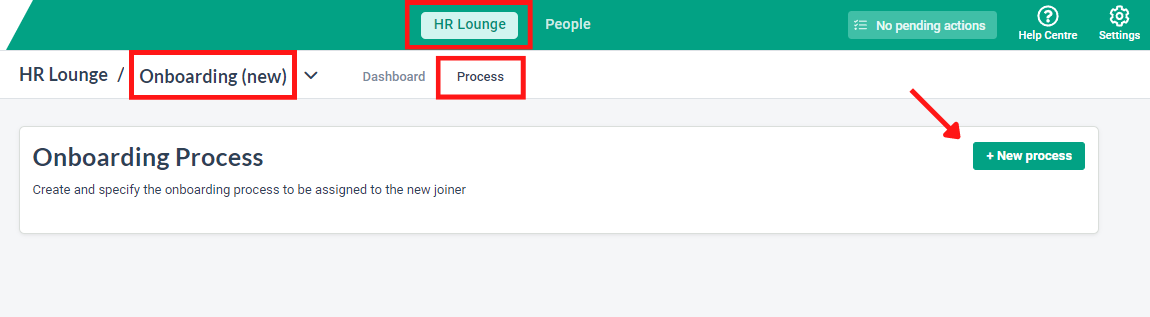
- Log in to BrioHR and go to HR Lounge.
- Click on Onboarding (new) and select Process.
- Create and configure your onboarding processes in the new version by clicking on +New process.
NOTE:
Settings cannot be duplicated from the previous version, so ensure you configure the new onboarding settings accordingly.
Adding New Joiners and Transitioning Data
Q: How do I add new joiners to the new version, and where will they go?
To add new joiners to the new version of the Onboarding module, follow these steps:
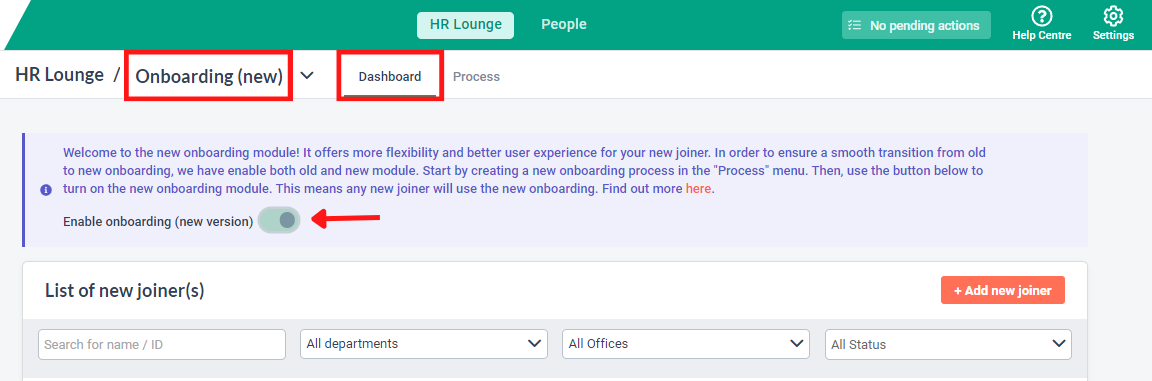
- In HR Lounge, go to Dashboard > Onboarding (new) and activate the toggle labeled "Enable onboarding (new version)."
- Once the toggle is enabled, any new joiners you add will automatically go to the new version of the module.
To add new joiners using other methods, please refer to this article: How to Add a New Employee to the Onboarding Process
Completing the Transition
Q: All new joiners in the previous version have completed their onboarding process. What should I do next?
- Ensure that you’ve enabled the toggle "Enable onboarding (new version)" in the new version.
- Contact our Support Team via Live Chat or email at support@briohr.com to request the deactivation of the previous version of the Onboarding module in your account. Your completed new joiner data will remain intact in the system.
We hope this guide helps you transition smoothly to the new version of the Onboarding module.
Happy onboarding!
Need Assistance?
If you have any questions or require assistance, please reach out to our support team via live chat or email us at support@briohr.com.