![brioHR-logo-color.svg]](https://support.briohr.com/hubfs/brioHR-logo-color.svg)
Note: For a comprehensive overview of the brioHR API integration flow, please refer to the article here.
IMPORTANT:
To enable this integration, you will need to contact our support team via email or live chat so we can provide the necessary access. Please contact us via:
- Email: support@briohr.com
- Live chat: Available 9 am - 6 pm (Kuala Lumpur working days)
Note: If you are still in the implementation stage, please reach out to your implementation manager for support.
The integration flow with brioHR will consist of the steps below:
- Client request for the APIs/integration access together with the list of IPs (recommended for securing the line of integration).
- brioHR will create the credentials for client. Consists of: Authentication credentials and client’s ID.
- Client can try to connect to brioHR API using the link, authentication & ID.
Data Processing Strategy: Default (Full Action log) vs. first & last log
When your API integration is set up, brioHR will configure it with one of two processing strategies. Let us know which one fits your data source when you request API access, so we can set it up correctly.
| Strategy | How it works | Best for |
|---|---|---|
| Default (Full Action log) |
Each clock record you POST must already be correctly labelled as clock_in or clock_out, in the correct chronological order. brioHR takes the records as-is. |
Source systems that can reliably output clean, pre-sorted, correctly-labelled clock data. |
| first & last log | You can POST raw, unsorted clock records, timestamps don't need to be in order and don't need to be pre-validated. For each employee, for each calendar day, brioHR collects all clockings for that day, sorts them by timestamp, and treats the earliest timestamp as Clock-In and the latest as Clock-Out. | Source systems that send clock data out of sequence, late, or without guaranteed clean labelling. You do not need to pre-clean data before sending it via the API. |
Notes on first & last log strategy:
- If only one clock exists for an employee on a given day, it is treated as Clock-In only, and the day is marked incomplete for Clock-Out (no Clock-Out is inferred).
- If new data for a day that was already processed arrives later (e.g., a late or backdated clocking), brioHR will recompute Clock-In/Clock-Out for that day using the combined old and new data, and update the attendance record accordingly.
Report API URL:
https://static.api.briohr.com/v2/api/external/timelogs
HTTP METHOD: POST
| Header | Value |
| Authorization |
Basic base64_encode(<username:password>) |
| x-api-context-company | <company id> |
| x-resource-type | timelogs |
| Content-Type | application/json |
Request:
Payload Example:
[
  {
    "employeeInternalId": "EMP001",
    "timestamp": "2024-05-28T10:30:00Z",
    "action": "clock_in"
  },
  {
    "employeeInternalId": "EMP002",
    "timestamp": "2024-05-28T10:36:21Z",
    "action": "clock_in"
  }
]
NOTE:
If your integration is set to first & last log strategy, you can POST multiple clock_in/clock_out records per employee per day in any order within the payload; brioHR determines the actual first Clock-In and last Clock-Out for you. You are not required to pre-sort the array or guarantee that each record's action label is accurate relative to its position in the day.
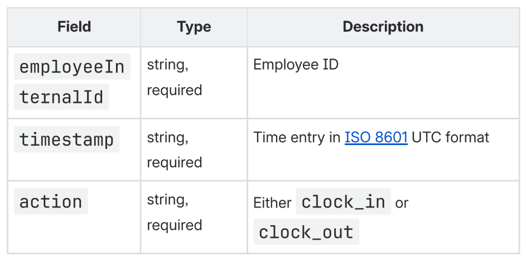
Fields:
Important:
- Timestamp must be in ISO 8601 UTC format (with 'Z' suffix).
- Action field accepts only "clock_in" or "clock_out" values.
Response:
Success
{
  "status": "success",
  "data": [
    {
      "referenceId": "6836948c32c9522cf819e11d",
      "employeeInternalId": "EMP001",
      "timestamp": "2024-05-28T10:30:00Z",
      "action": "clock_in"
    },
    {
      "referenceId": "6836948c32c9522cf819f19g",
      "employeeInternalId": "EMP002",
      "timestamp": "2024-05-28T10:36:21Z",
      "action": "clock_in"
    }
  ]
}
Error:
Bad Request
[
  {
    "employeeInternalId": "", // will trigger error (Missing required field)
    "timestamp": "225-05-28T10:30:00Z", // will trigger error (Invalid timestamp format)
    "action": "clock_in"
  },
  {
    "employeeInternalId": "EMP002",
    "timestamp": "2025-05-28T10:36:21Z",
    "action": "invalid_action" // will trigger error (Invalid action value)
  }
]
Response:
{
  "status": "error",
  "errors": [
    {
      "code": "Missing required field",
      "field": "[0].employeeInternalId"
    },
    {
      "code": "Invalid timestamp format",
      "field": "[0].timestamp"
    },
    {
      "code": "Invalid action value. Must be 'clock_in' or 'clock_out'",
      "field": "[1].action"
    }
  ]
}
NOTE:
Even under first & last log strategy, each individual record must still have a valid employeeInternalId, a validly formatted ISO 8601 timestamp, and an action of either clock_in or clock_out .what's relaxed is the requirement that records be pre-sorted or that the label be positionally accurate for the day.
Example of CURL
curl --location 'https://static.api.briohr.com/v2/api/external/timelogs' \
--header 'Authorization: Basic aHotYXBw0mJyaW9ocg==' \
--header 'x-api-context-company: 412cc8a9d90158c489b83e83' \
--header 'x-resource-type: timelogs' \
--header 'Content-Type: application/json' \
--data '[
{
"employeeInternalId": "EMP001",
"timestamp": "2024-05-28T10:30:00Z",
"action": "clock_in"
},
{
"employeeInternalId": "EMP002",
"timestamp": "2024-05-28T10:36:21Z",
"action": "clock_in"
}
]'
NOTE:
Kindly be informed that brioHR will need to whitelist the client's IP and then provide the client with the username, password and company ID.
LIMITATION:
brioHR is only able to process up to 45 days of backdated clock-in/out data. Any data sent for attendance records more than 45 days old will not be processed.
Frequently Asked Questions (FAQs)
Q1: What's the difference between "Default" and "first & last log" strategy?
A: With Default, each record you POST must already be correctly labelled as clock_in/clock_out and reflect the true order of events; brioHR uses them as-is. With first & last log, you can POST raw, unsorted clock data; brioHR sorts all clocking per employee per day and automatically treats the earliest as Clock-In and the latest as Clock-Out.
Q2: Which strategy should I use?
A: If your source system can reliably output clean, pre-sorted, correctly labelled data, Default works well. If it sends data out of order, late, or without guaranteed accurate labelling, ask us to set your integration to first_last so you don't need to pre-clean data before sending it.
Q3: What happens if I only send one clocking for an employee on a given day?
A: Under the first & last log strategy, that single clocking is treated as Clock-In only, and the day is marked incomplete for Clock-Out.
Q4: What if I send late or backdated data for a day that was already processed?
A: Under the first & last log strategy, brioHR will recompute that day's Clock-In/Clock-Out using the combined old and new data, and update the attendance record. Note: This may change a previously calculated timesheet value (including OT and shift premiums/deductions) if late data shifts the actual first/last clocking.
Need Assistance?
If you have any questions regarding the API above or require assistance, please reach out to our support team via live chat or email us at support@briohr.com.