![brioHR-logo-color.svg]](https://support.briohr.com/hubfs/brioHR-logo-color.svg)
The API Integration available for the Leave module include the Leave Summaries Integration and also the Leave Records Integration.
Note: For a comprehensive overview of the BrioHR API integration flow, please refer to the article here and click here for the guide on the Leave Summaries (API Integration)
The integration flow with BrioHR will consists of the steps below:
- Client request for the APIs/integration access together with the list of IPs (recommended for securing the line of integration).
- BrioHR will create the credentials for client. Consists of: Authentication credentials and client’s ID.
- Client can try to connect to BrioHR API using the link, authentication & ID.
NOTE:
If you would like to exclude payroll information from the API integration, this option can be enabled upon request.
Please contact our support team to let us know, and we will assist with configuring the settings for your account.
Report API URL:
https://static.api/briohr.com/v2/api/external/reports/who-is-away
|
Header |
|
|
Authorization |
Basic base64_encode(<username:password>) |
|
x-api-context-company |
<company id> |
|
x-resource-type |
leave-summaries |
|
Query Parameter |
Mandatory/Optional |
Example Value |
|
format |
Optional Default json ) |
json | csv |
|
fromDate |
Mandatory |
20200112T00:00:00Z |
|
toDate |
Mandatory |
20220111T00:00:00Z |
|
arePendingLeavesIncluded |
Optional Default false ) |
true | false |
For Power BI & other 3rd party that cannot inject the x-api-context-company in the header:
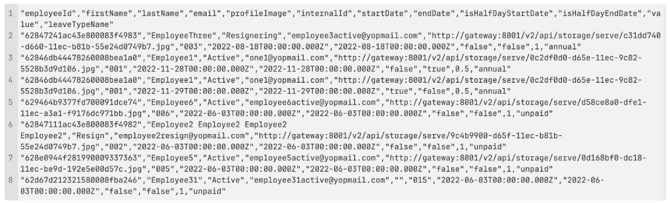
Expected output: list_of_leave.csv
Example of CURL

Example of CURL for PowerBI

Example of Output
External_-_List_of_leave-1768810157306.csv
NOTE:
Kindly be informed that BrioHR will need to whitelist the client's IP and then provide the client with the username, password and company ID.
Need Assistance?
If you have any questions regarding the API above or require assistance, please reach out to our support team via live chat or email us at support@briohr.com.