![brioHR-logo-color.svg]](https://support.briohr.com/hubfs/brioHR-logo-color.svg)
Audience & Scope
Audience: HR Admin / Payroll Processor
Module: Payroll
Country: Malaysia
Step 1: Setting Up The Bank Account
-
In HR Lounge, navigate to the Payroll module.
-
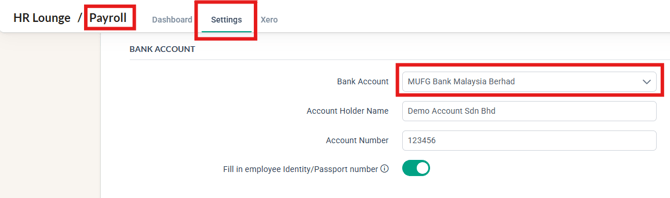
Click on Settings and scroll down to the Bank Account column.
-
In the "Bank Account" field, select MUFG Bank Malaysia Berhad
- Enter the required information in the fields provided (refer to the sample screenshot below)
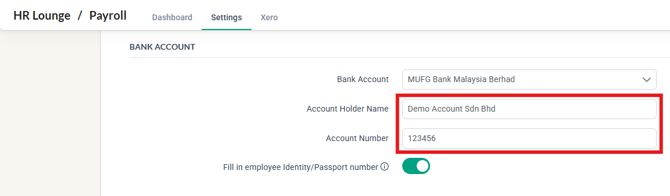
- Click Save at the bottom of the Settings page to complete the setup.
NOTE:
The function to 'Fill in employee Identity/Passport number' is optional as some bank specifications require for this information to be filled in when the bank file is generated. Therefore, you may proceed to enable this function before the bank file is generated. 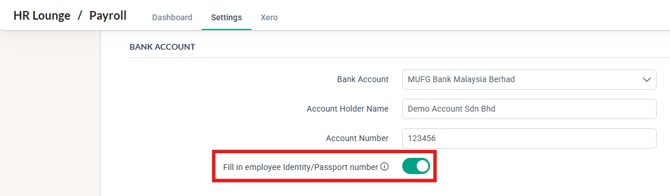
Step 2: Downloading The Bank File
- In HR Lounge, navigate to the Payroll module.
- In the Payroll Dashboard, click on the COMPLETED payroll cycle for which you want to process payments.
- Scroll down to the Bank File column and, based on your payroll cycle, click the Download button (as shown in the sample screenshots below) to download the bank file.
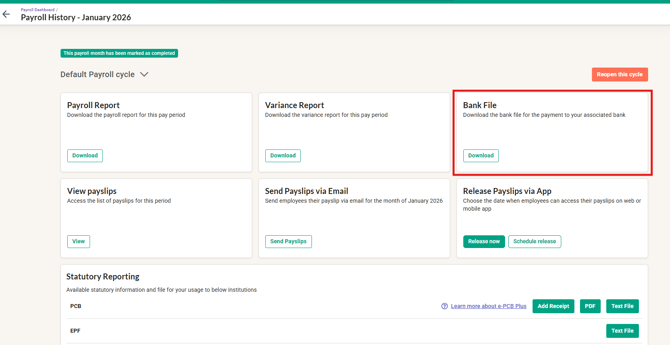
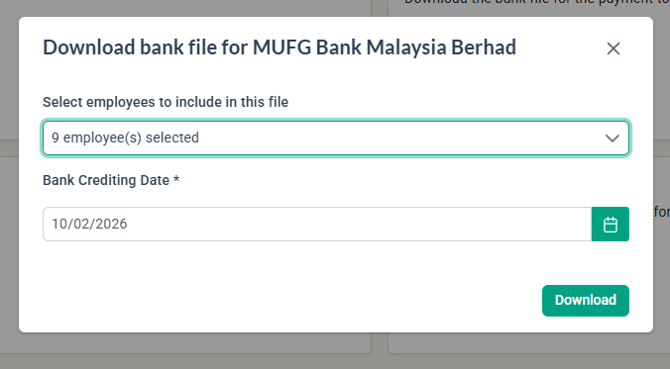
- In the "Download bank file for MUFG Bank Malaysia Berhad" pop-up window:
- Select the employee(s).
- Choose the Bank Crediting Date.
- Click Download to download the file.
- Once you have downloaded the bank file for Payroll, proceed to upload the file to the Bank's Portal for payment.
NOTE:
If any information is missing, you will be unable to generate the bank file, and a warning prompt will appear (as shown in the screenshot below).
To resolve this, input the missing information and then attempt to generate the bank file again.

Common Issues/ FAQ
1. The bank file that is uploaded shows an error message of invalid format
Ans: Ensure that the correct file is being used to upload onto the correct portal. For example, if the bank file downloaded is being uploaded onto the Statutory portal, this error message will appear.
2. The bank file uploaded states that there is incomplete information - missing Identity/Passport Number
Ans: Ensure the toggle to Fill in the Identity/Passport Number has been enabled before the bank file is generated.
Related Articles
1. How to Process Payroll in the Correct Order with BrioHR
2. Payroll Malaysia: Step-by-Step Guide to Download Statutory Contribution Text Files (EPF, SOCSO, EIS, PCB)
3. How to Manage BrioHR Multicycle Payroll: Guide + Video
Last Updated & Ownership
Last Updated: 11 February 2026
By: Aqilah Ridzuan