![brioHR-logo-color.svg]](https://support.briohr.com/hubfs/brioHR-logo-color.svg)
Audience & Scope
Audience: All Users
Module: Leave, Time Attendance, Expense Claim, Pulse
Country: Global
Pre-requisite: brioHR Mobile App downloaded
The brioHR Mobile App now supports push notifications, allowing you to receive real-time alerts whenever there's an action that requires your attention. Instead of opening the app to manually check for updates, you'll be notified instantly, helping you stay on top of approvals, requests, and other important activities wherever you are.
What are Push Notifications?
Push notifications are instant alerts sent directly to your mobile device whenever there is a new action waiting for you in brioHR.
Whether it's an approval request or another task requiring your attention, you'll receive a notification as soon as it becomes available, making it easier to respond promptly without repeatedly checking the app.
TIP: Ensure 'Allow Notification' settings has been enabled for brioHR Mobile App.
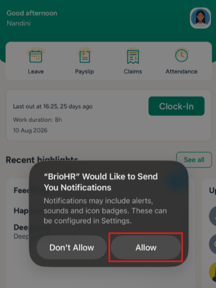
1) Once you login and click into the brioHR Mobile App, a pop-up automatically appears with a prompt for allow notifications to be received, click Allow
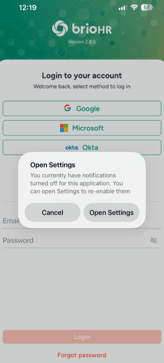
2) However, IF you click into the brioHR Mobile app (Notification setting disabled) and come across this pop up, click into Open Settings
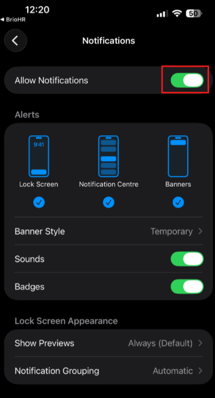
3) Ensure under the Notifications, Allow Notifications has been enabled.
Open Tasks with a Single Tap
Each push notification is linked directly to the relevant task within the brioHR Mobile App.
Simply tap the notification, and you'll be taken straight to the corresponding task details screen, allowing you to review and take action immediately.
This creates a faster and more seamless experience by reducing the number of steps needed to access your pending tasks.
Refer to this quick visual guide below:
IMPORTANT:
For users with access to multiple company branches or subsidiaries, push notifications are designed to work seamlessly across accounts.
If you are currently logged into your main branch and receive a notification for a task belonging to one of your subsidiary branches, tapping the notification will automatically:
- Switch you to the correct subsidiary account.
- Open the relevant task details screen immediately.
This eliminates the need to manually switch branches before accessing the task, ensuring you can respond more efficiently regardless of which branch the notification belongs to.
Supported Push Notifications
View the article attached below for the list of articles currently supported by brioHR Mobile App:
List of Push Notifications on brioHR Mobile App
Stay Connected Wherever You Are
With real-time push notifications, important updates are delivered directly to your device, helping you respond faster, reduce missed approvals, and stay connected to your HR tasks without needing to constantly check the app.
Make sure push notifications are enabled for the brioHR Mobile App in your device settings to receive alerts as soon as they're available.
Ownership
By: Arveena