![brioHR-logo-color.svg]](https://support.briohr.com/hubfs/brioHR-logo-color.svg)
Audience & Scope
Audience: All users
Country: Global
Pre-requisites: Reach out to Chat Support to enable this feature within the account.
We are excited to announce that Thai is now available as a language option in brioHR. Users can now switch their system language to Thai for a more localized and user-friendly experience.
IMPORTANT:
Please reach out to brioHR Chat Support or send us an email at support@briohr.com to request for this language to be enabled for your account first.
How to Change Your Language to Thai
Follow these simple steps to enable the Thai language:
- Click on your Profile icon in the top-right corner of the screen.
- Select User Settings.
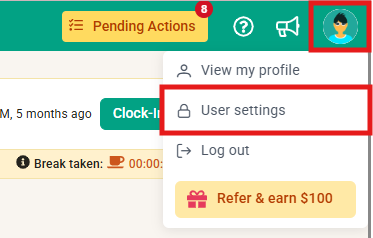
- Under Change Language, click the dropdown menu.
- Select Thai from the list of available languages.
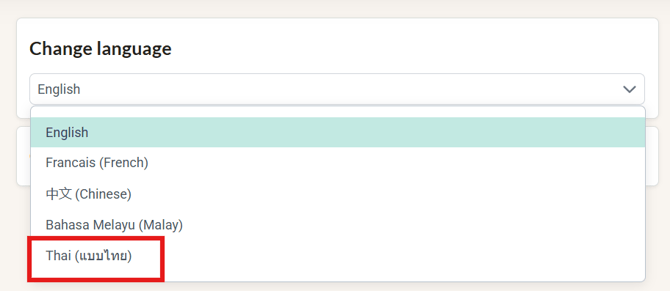
- The language change will be applied automatically—no additional steps are required.
IMPORTANT:
- The language preference is applied at the user level, allowing each user to choose their preferred display language independently.
- Once selected, the brioHR interface will immediately display in Thai.
Ownership
By: Arveena