![brioHR-logo-color.svg]](https://support.briohr.com/hubfs/brioHR-logo-color.svg)
Audience & Scope
Audience: HR and admin teams setting up brioHR for the first time
Module: Time Attendance
Country: Malaysia, Singapore
Pre-requisites: Implementation kick-off meeting with your Implementation Manager (IM) completed; the Time Attendance migration template from your IM; Employee List loaded and verified (Profile & Dashboards)
This article is part of the Time Attendance data migration series. It follows the Time Attendance Data Migration Guide (PDF).
The big picture
Who does what: HR, operations and Payroll
| Role | Looks after | In this guide |
|---|---|---|
| HR / Admin | Work schedules, Time Attendance policies, who follows which schedule and policy, and clock-in rules. | Work Schedules, Work Pattern Variation and TA Policies tabs; settings to agree with your IM. |
| Operations / department heads | Shift timings, working patterns, and who works which shift. Often the supervisors who publish rosters and approve overtime. | Work Shifts and Work Schedules tabs. |
| Payroll / Finance | How overtime, shift premiums and deductions are paid. | Overtime and payroll settings in Time Attendance Settings to Agree with Your IM. |
⚠ Important
Time Attendance has its own Timesheet tab (HR Lounge > Time Attendance > Timesheet), where each employee's clock-ins, lateness and overtime for the week or month are approved and sent to payroll. This is not the same as the Timesheets module, which tracks the hours employees spend on projects and has its own migration template.
Key terms
Roster: The shift each employee works on each day, filled in from their schedule. Supervisors and HR can change it, and must publish it before employees can see their shifts and clock in.
Supervisor: The person who manages an employee's roster, attendance and timesheet, and approves their overtime. Set in the policy: the employee's manager, or a specific employee.
Timesheet: An employee's attendance for a week or a month: hours worked, breaks, lateness, early outs and overtime. Once approved, it can be sent to payroll.
Shift premium / deduction: An amount added to or taken from pay for shifts with a certain tag, for example a night shift premium, or a deduction for lateness.
How time attendance works in brioHR
Every working day follows the same steps. On the left is what happens; on the right is the part of your template, or the setting you agree with your IM, that decides it.
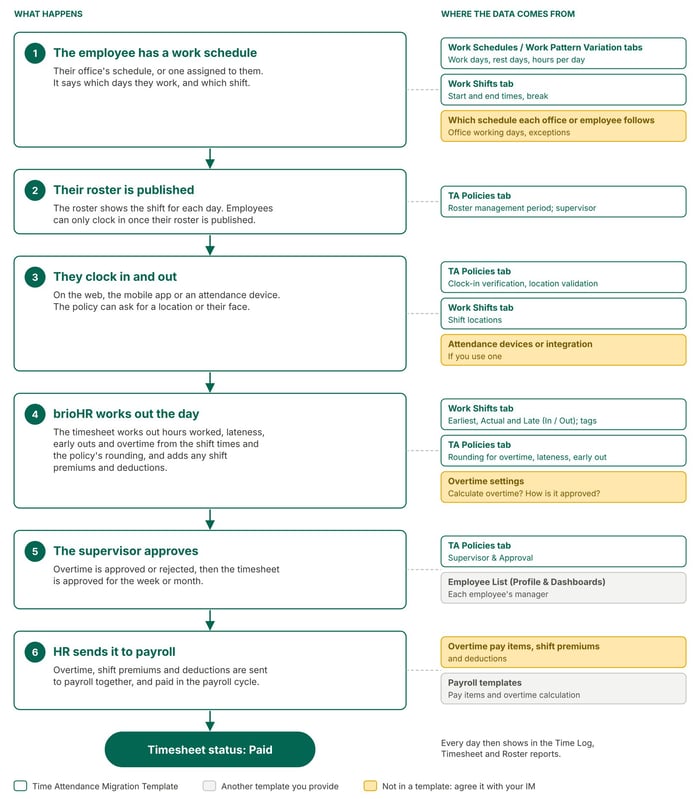
How a working day moves through brioHR, and the data behind each step.
← Previous: Time Attendance Data Migration and Verification: Start Here
Next: What to Prepare Before Filling In Your Time Attendance Template →
Back to Time Attendance Data Migration and Verification: Start Here
Ownership
By: Aqilah