![brioHR-logo-color.svg]](https://support.briohr.com/hubfs/brioHR-logo-color.svg)
Audience & Scope
Audience: HR and admin teams setting up brioHR for the first time
Module: Payroll Malaysia
Country: Malaysia
Pre-requisites: Implementation kick-off meeting with your Implementation Manager (IM) completed; the Company Payroll Info (MY) and Employee Payroll Data (MY) templates from your IM; Employee List loaded and verified (Profile & Dashboards)
This article is part of the Payroll Malaysia data migration series. It follows the Payroll Malaysia Data Migration Guide (PDF).
What data you'll be providing
Your data lives in two templates, which your Implementation Manager (IM) will send you.
| # | Data group | What you provide | Template and tab |
|---|---|---|---|
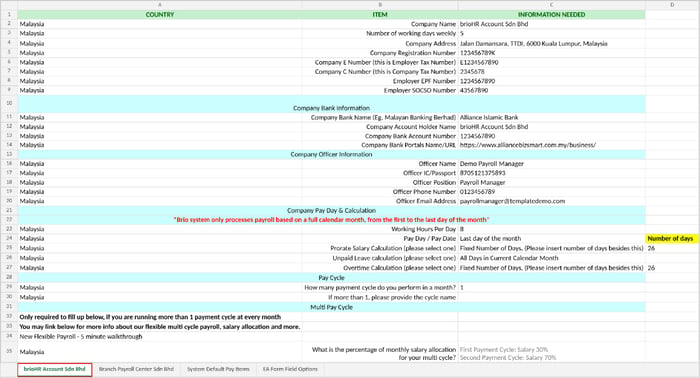
| 1 | Payroll centers | How many payroll centers you have, company registration and officer information for statutory forms, calculation-related settings, company bank info for salary disbursement, and pay cycle details. | Company Payroll Info (MY) Tab: one tab per payroll center (left side of the tab, see the image below) |
| 2 | Pay items | Custom allowances and deductions, and statutory settings for each one. | Company Payroll Info (MY) Tab: one tab per payroll center (right side of the tab) Reference tab: System Default Pay Items |
| 3 | Employee payroll data | Basic salary, EPF/SOCSO/EIS/PCB settings, bank details. | Employee Payroll Data (MY) Tab: Employee payroll data |
| 4 | New joiner tax (TP3) | Prior employment income and tax already deducted this year, for employees who joined partway through the year. | Employee Payroll Data (MY) Tab: New Joiners TP3 (year-specific tab name) |
| 5 | Fixed allowances and deductions | Details of allowances and deductions that are the same amount every month. | Employee Payroll Data (MY) Tab: Employee Fixed Allowance/Deduction |
| 6 | Payroll History Reports | Details (Reports) of your completed past payroll months in the current year. | No template Send your reports in Excel format (see How Statutory Contributions and Payroll History Are Captured in Your Templates (Malaysia Payroll Guide)) |
Where data groups 1 and 2 go: a payroll center tab in the Company Payroll Info (MY) template. Company details, bank and officer information, pay day and calculation, and pay cycles are on the left side of the tab; pay items are on the right.
Get ready: a quick readiness checklist
| Get ready | Why | |
|---|---|---|
| ☐ | Your Employee List template is filled in (see the Profile & Dashboards guide). It doesn't need to be verified yet; that happens in the data verification articles | Payroll attaches pay data to each employee by name, Staff ID/Employee ID (if used) and email. Rows that can't be matched can't be loaded. |
| ☐ | You know how many payroll centers you have and who manages each. | Each payroll center gets its own tab. Its payroll managers need to be set up too (see the tip in Understanding the Payroll Data Migration Process (Malaysia Payroll Guide)). |
| ☐ | You have your company details: registration number, E number (employer tax), C number (company tax), and employer EPF and SOCSO numbers. | These sit at the top of the Company Payroll Info template and identify your company on statutory reports and forms. |
| ☐ | You have your company bank details for salary disbursement and the details of your company's payroll officer. | The bank file brioHR generates is built from the company bank details, so they need to be correct. |
| ☐ | You've decided your default pay day and how you want salary proration, unpaid leave and overtime to be calculated. | These rules apply to every payslip, so agree them before you fill in the template. |
| ☐ | You know how many payment cycles you run each month (and the salary split, if more than one). | Only needed if you run more than one cycle a month. |
| ☐ | You have your list of allowances and deductions, and which count towards statutory calculations. Check the System Default Pay Items tab first. | Each pay item's settings decide whether it counts for tax, EPF, SOCSO, EIS and HRDF. |
| ☐ | You have each employee's pay figures, IC or passport number, EPF category and number, tax number and bank details. Include employees who resigned earlier this year. | These fill the main Employee payroll data tab. Missing details give wrong statutory deductions or stop the employee being paid by bank file. |
| ☐ | You know how many children each employee will claim tax relief for (leaving out any claimed by a working spouse). | Child counts decide each employee's PCB tax relief. |
| ☐ | You know which employees joined partway through this year and have their TP3 figures. | Without TP3, PCB for new joiners can be wrong for the rest of the year. |
| ☐ | You know which employees have a fixed monthly allowance or deduction. | These go in the Fixed Allowance/Deduction tab. Left out, they have to be added by hand every month. |
| ☐ | You have the payroll report from the start of the year to the most recent completed payroll month. | We migrate your past payroll so your year-to-date numbers tally at go-live. |
← Previous: Understanding the Payroll Data Migration Process (Malaysia Payroll Guide)
Next: How to Fill In the Company Payroll Info Template (Malaysia Payroll Guide) →
Back to Payroll Data Migration and Verification: Start Here (Malaysia Payroll Guide)
Ownership
By: Aqilah