![brioHR-logo-color.svg]](https://support.briohr.com/hubfs/brioHR-logo-color.svg)
Effective July 2026, PERKESO has made the SKBBK contribution — also known as Lindung 24 Jam or Lindungan 24 — optional for local employees and mandatory only for foreign employees. This article guides you through making changes to SKBBK (SOCSO Lindung24) contribution settings for individual employees and in bulk — for example when staff opt out of the scheme ("staff tidak bersetuju skim Lindung 24 jam") and payroll must be updated before the next run.
Audience & Scope
Audience: HR Admin, Payroll Managers
Module: Payroll
Country: Malaysia
Pre-requisites: Access to Payroll in HR Lounge, Access to view employee profile information
Step-by-Step Instructions
Option 1: Changing the SOCSO Contribution Option for Individual Employee
1. Go to HR Lounge > Employee Management
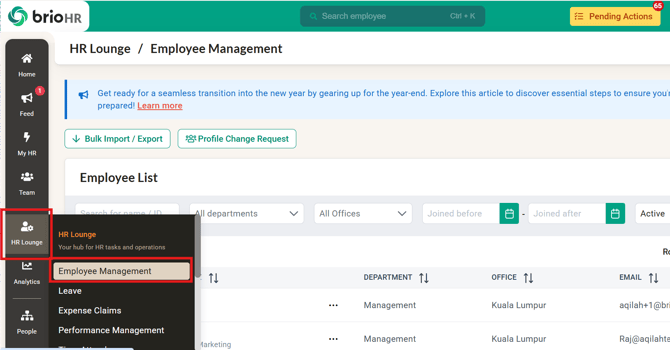
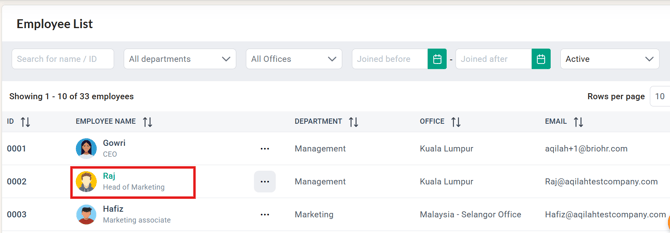
2. Click on the employee's profile you want to change.
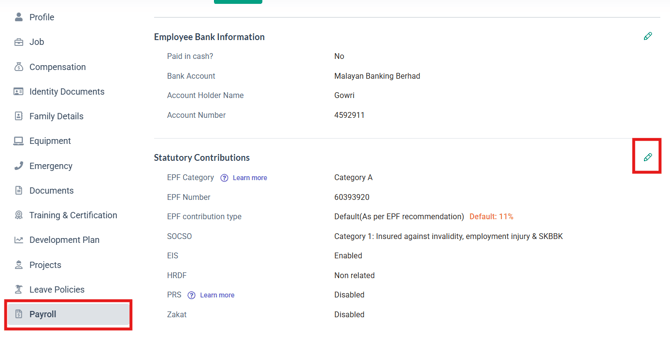
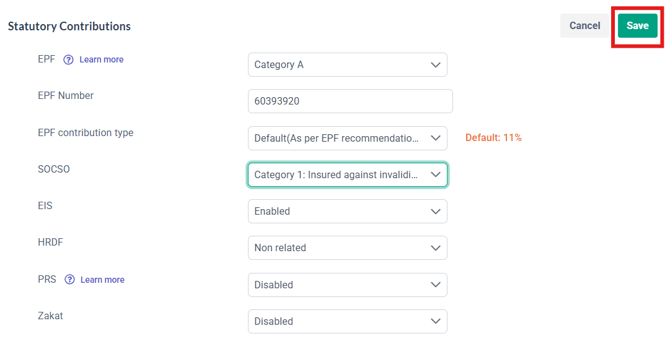
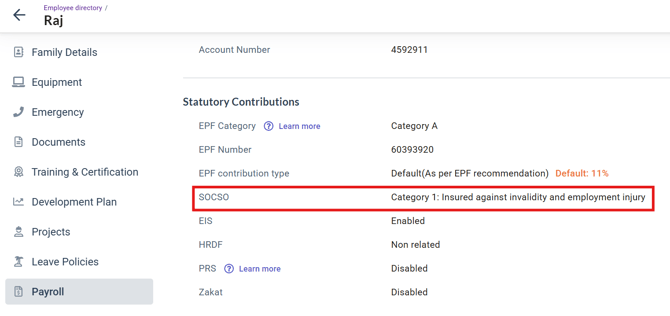
3. Click the Payroll tab and scroll down to the Statutory Contributions section. Click the Edit button
4. Click the SOCSO option and make the changes necessary.
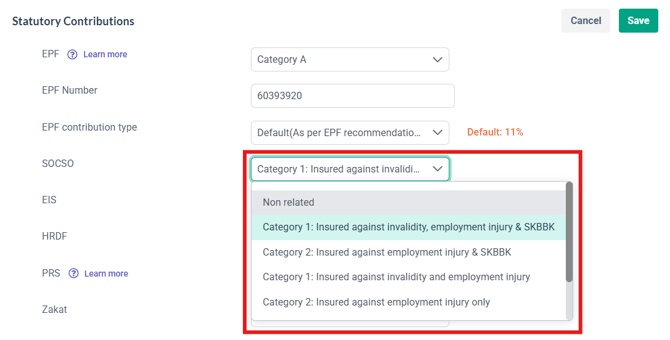
For the non-SKBBK option, choose:
-
Category 1: Insured against invalidity and employment injury (third option in the dropdown)
- Category 2: Insured against employment injury only (fourth option in the dropdown)
5. Click Save to confirm your changes
Option 2: Changing the SOCSO Contribution Option in bulk
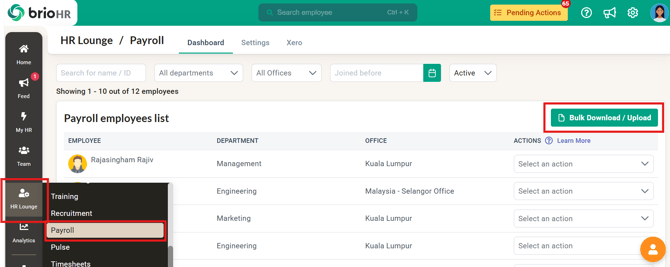
1. Go to HR Lounge > Payroll and scroll to the Payroll Employee List section to find the Bulk Download/Upload button
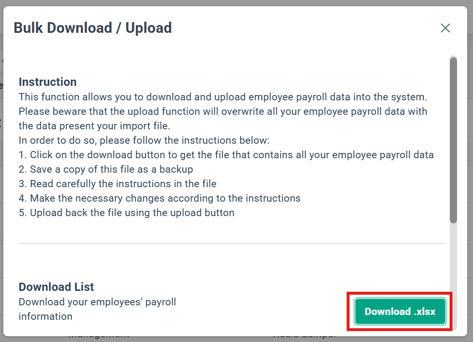
2. Download the Excel with your employees' payroll information
3. In the Excel, find the SOCSO column and make the changes for employees in bulk
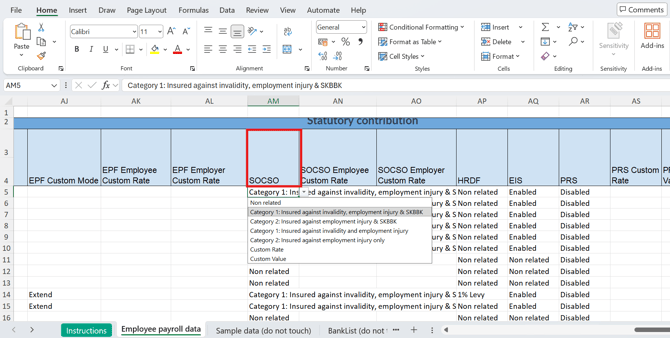
For the non-SKBBK option, choose:
-
Category 1: Insured against invalidity and employment injury (third option in the dropdown)
- Category 2: Insured against employment injury only (fourth option in the dropdown)
4. Save the Excel and upload it using Bulk Download/Upload
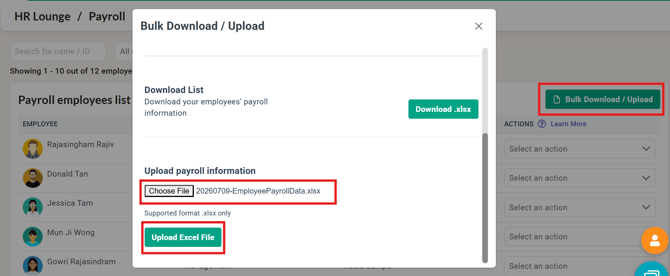
5. Once done, your changes should reflect in all Employee Profile > Payroll > Statutory Contributions > SOCSO
Which SOCSO category applies — with vs without SKBBK:
| Employee Group | Age & Joining Eligibility | SOCSO Scheme Category | WITHOUT SKBBK (Standard SOCSO / Opted-Out) | WITH SKBBK (Lindung 24 Jam — Phase 1) | Mandatory vs. Voluntary (Opt-Out Rules) |
|---|---|---|---|---|---|
| Malaysian Employees | Under 60 (joined SOCSO before age 55) | Category 1 (Employment Injury + Invalidity) | Employer: 1.75% · Employee: 0.5% | Employer: 1.75% · Employee: 1.25% (0.5% Invalidity + 0.75% SKBBK) | Default (Voluntary Opt-Out): auto-enrolled by default; employee can opt out via Perakuan Pelepasan Liabiliti. |
| Malaysian Employees | 60 and above (OR first joined SOCSO at 55+) | Category 2 (Employment Injury Only) | Employer: 1.25% · Employee: 0% | Employer: 1.25% · Employee: 0.75% (0% Invalidity + 0.75% SKBBK) | Default (Voluntary Opt-Out): auto-enrolled by default; employee can opt out via Perakuan Pelepasan Liabiliti. |
| Foreign Employees | Under 60 (joined SOCSO before age 55) | Category 1 (Employment Injury + Invalidity) | N/A (SKBBK is mandatory) | Employer: 1.75% · Employee: 1.25% (0.5% Invalidity + 0.75% SKBBK) | Mandatory: compulsory under Act 4 for foreign workers; no opt-out allowed. |
| Foreign Employees | 60 and above (OR first joined SOCSO at 55+) | Category 2 (Employment Injury Only) | N/A (SKBBK is mandatory) | Employer: 1.25% · Employee: 0.75% (0% Invalidity + 0.75% SKBBK) | Mandatory: compulsory under Act 4 for foreign workers; no opt-out allowed. |
What does the "Non related" option mean?
Select Non related when the employee is not required to contribute to either SOCSO or SKBBK (no SOCSO scheme applies to them). If the employee contributes to SOCSO, use the Category 1/2 options above instead.
NOTE:
-
Please consult with PERKESO for any inquiries regarding refunds and configuration of payroll items for this specific purpose.
- The SKBBK contribution remains mandatory for Foreign Workers (as of 9th July 2026)
- If your company chooses to reimburse employees for the June deduction, you can use a custom income pay item in a later payroll cycle — we recommend confirming the approach with PERKESO first.
See: How to Edit a Completed Payroll Cycle and How to Create a Custom Pay Item in BrioHR.
Common Issues/FAQ
Q: Will this affect my previous SOCSO contribution?
A: No. If you have completed your payroll month (June 2026) and made the payout, your payroll records will remain unchanged.
Q: Can I see the SKBBK amount separately in the payroll report?
A: Not yet in the report — the payroll report shows the total SOCSO amount and cannot isolate the SKBBK portion (an improvement is work in progress; we will communicate to clients once it is available). During payroll processing, however, you can hover over the exclamation-mark tooltip next to the SOCSO amount to see the SOCSO vs SKBBK breakdown for each employee. Official reference: PERKESO — Skim Kemalangan Bukan Bencana Kerja (Lindung 24 Jam)
Q: Can I update the SKBBK option for many employees at once?
A: Yes — use Option 2 above: go to HR Lounge > Payroll > Payroll Employee List > Bulk Download/Upload, download the Excel, update the SOCSO column for the affected employees (pick the correct Category 1/2 — see the mapping table above), then upload the file again. The changes reflect in each Employee Profile > Payroll > Statutory Contributions > SOCSO.
Related Articles
New PERKESO SKBBK Contribution Requirement Effective 1 June 2026
Ownership
By: Aqilah