![brioHR-logo-color.svg]](https://support.briohr.com/hubfs/brioHR-logo-color.svg)
Audience & Scope
Audience: HR Admin
Module: Time Attendance
Country: Global
Pre-requisites: HR Lounge access to Time Attendance module enabled
Step-by-Step Instructions to enable the Employee Pre-Approval function
-
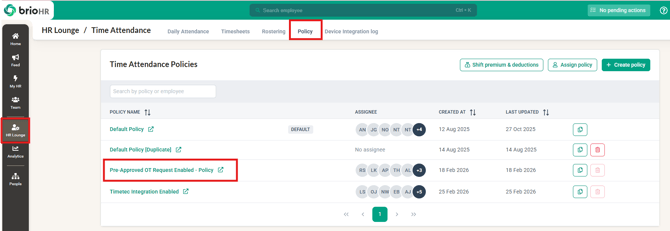
Click into HR Lounge and into the Time Attendance module
-
Proceed to click Policy tab and into the selected Policy which requires this setting
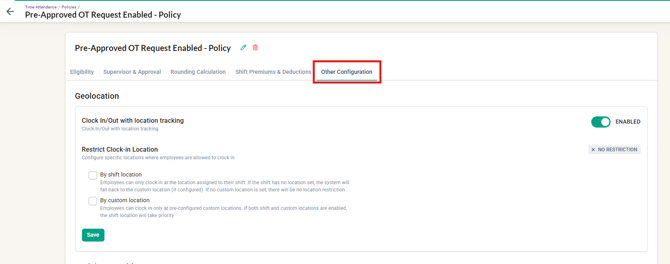
- Within the Policy, click into the Other Configuration
- Scroll down to Overtime and enable the 'Employee request for pre-approve overtime' then click Save
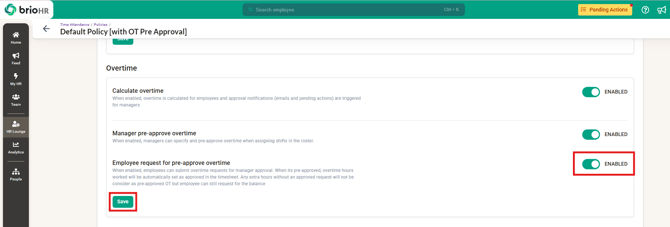
- Now that the function is enabled, Employees will be able to submit Overtime requests for Pre-Approval within the Rostering page.
Impact of enabling this setting: once pre-approved overtime is required by the policy, overtime worked without an approved pre-approval request is automatically rejected in the timesheet. Calculate Overtime keeps running — only the approval requirement changes. If you do not want non-pre-approved overtime to be auto-rejected, keep this setting off (Calculate Overtime can stay on).
Related Articles
1. Managing Pre-Approval Overtime Submission Requests as a Manager
2. Requesting Pre-Approved Overtime as an Employee
Ownership
By: Arveena