![brioHR-logo-color.svg]](https://support.briohr.com/hubfs/brioHR-logo-color.svg)
Audience & Scope
Audience: HR Admin
Module: Time Attendance
Country: Global
Pre-requisite: HR Lounge access to the Time Attendance module
How to enable the Post OT Submission by employee function
-
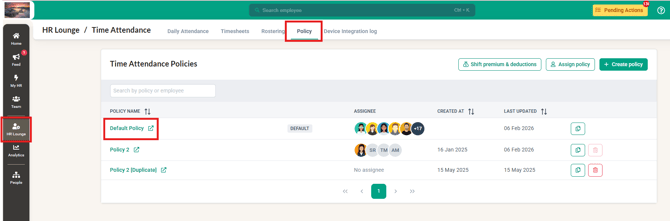
Click into HR Lounge and into the Time Attendance module
-
Proceed to click the Policy tab and select the Policy that requires this setting
-
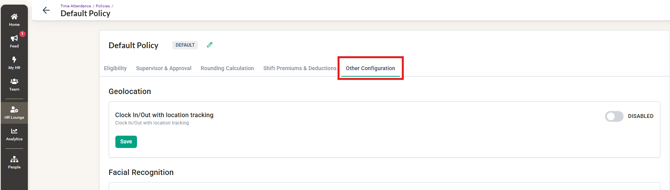
Within the Policy, click into the Other Configuration
-
Scroll down to Overtime and enable 'Calculate overtime' and 'Employee submit overtime for approval' then click Save
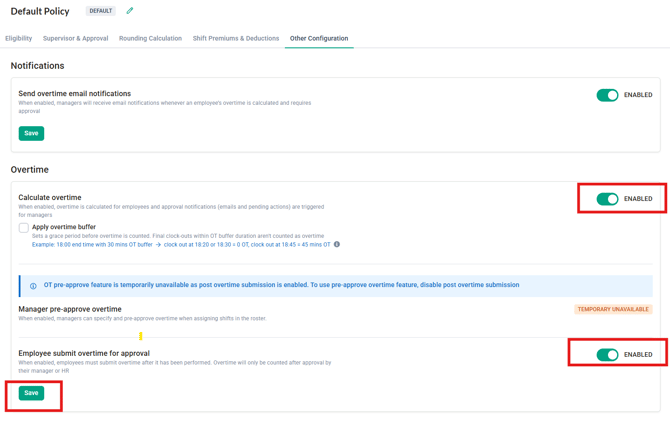
- Now that the function is enabled, employees will be able to submit overtime approval requests after working OT. Managers will receive notification and pending action to manage the OT request.
NOTE:
The 'manager pre-approve overtime' option CANNOT be enabled if the post overtime submission option is enabled. You can only enable one of these two options at a time.
Related Scenarios:
Q1: An employee worked overtime but did not request for the overtime to be approved. What will happen?
A1: The overtime will be auto-rejected when the timesheet is approved.
Q2: An employee worked overtime and submitted an approval request for the OT. However, the manager did not approve or reject the request. What will happen?
A2: The overtime will be auto-approved when the timesheet is approved.
Common Issues/FAQ
Q: What is the Post Overtime submission function?
A: The Post Overtime submission function allows employees to request approval for their OT hours, once the setting is enabled in the policy.
Q: Who can enable the Post Overtime submission setting?
A: Only HR or system administrators with access to policy settings in the Time Attendance module can enable this function.
Q: Where can I find the Post Overtime submission setting?
A: The setting is located under the selected Time Attendance policy, within the Other Configuration section. Scroll down to the Overtime settings to enable it.
Q: Can this feature be enabled for specific policies only?
A: Yes. The Post Overtime submission setting is policy-based, allowing HR to enable or disable it for specific employee groups as needed.
Related Articles
Ownership
By: Aqilah