![brioHR-logo-color.svg]](https://support.briohr.com/hubfs/brioHR-logo-color.svg)
Audience & Scope
Audience: HR Admin / Payroll & Claims Manager / IT Admin
Module: Payroll
Country: Global
Pre-requisites: HR Module permission for the Payroll Module
Note: For a comprehensive overview of the BrioHR API integration flow, please refer to the article here and and click here for the guide on the Claim Report (API Integration)
IMPORTANT:
To enable this integration, you will need to contact our support team via email or live chat so we can provide the necessary access. Please contact us via:
- Email: support@briohr.com
- Live chat: Available 9 am - 6 pm (Kuala Lumpur working days)
Note: If you are still in the implementation stage, please reach out to your implementation manager for support.
Prerequisites & Setup
Before issuing API requests, ensure the following prerequisites are completed:
- IP Whitelisting: The client system's outbound IP address must be whitelisted by brioHR.
- API Credentials: Request
username,password, andcompany IDfrom brioHR.
Overview & Operational Behavior
The Claim Import API enables external systems to push pre-approved expense claim reports directly into brioHR Payroll's Claims to Payroll > To process queue.
- Bypasses Approval Workflow: Claims pushed via this API must already be approved in the source system. brioHR does not trigger an in-app approval workflow; claims land directly in Payroll queue.
- Cycle Independence: Pushing claims does not require a payroll cycle to be open. Claims remain parked in the queue until a Payroll Admin processes them.
- Report Creation vs. Payslip Aggregation: Each API push creates its own report record in the
Claims to PayrollUI. When added to payroll, claims mapped to the same reimbursement item are automatically aggregated into a single line item on the employee's final payslip. - Internal ID Transformation: brioHR generates a deterministic internal MongoDB
ObjectIdderived from the client'sexternalClaimReportIdfor database storage. The original client ID is preserved in brioHR audit logs.
API Specification & Request Headers
- Endpoint URL:
https://static.api.briohr.com/v2/api/external/claims/import - HTTP Method:
POST - Content-Type:
application/json
| Header | Type | Value/Description |
| Authorization | String | Basic <base64_encode(username:password)> |
| x-api-context-company | String | <company id> (Target brioHR Company ID) |
| x-resource-type | String | Must strictly equal claim-import |
| Content-Type | String | application/json |
Security Guardrail:
The x-resource-type header is route-pinned. Passing any other resource module (e.g., leaves or timelogs), even if assigned to the API key, returns HTTP 403 Forbidden.
Request Payload Schema
Each request should contain a reports array with 1 to 100 report objects per batch. Unknown extra fields are automatically stripped and ignored (HTTP 201).
Schema Tree
reports [] (Array, Required, 1–100 elements)
 ├── externalClaimReportId (String, Required) - Unique report ID / Idempotency key
 ├── employeeEmail (String, Required) - Claimant's work email address
 ├── reportName    (String, Required) - Report label shown in brioHR
 ├── currency      (String, Required) - ISO 4217 uppercase code (e.g., MYR, SGD)
 └── claims []     (Array, Required, Non-empty) - Claim line items array
      ├── externalClaimId  (String, Required) - Unique claim line item ID
      ├── payrollItem      (String, Required) - Target reimbursement item label
      ├── claimableAmount  (Number, Required) - Min 0.01, max 2 decimal places
      ├── taxAmount        (Number, Optional) - Min 0, max 2 decimal places (Default: 0)
      ├── description      (String, Optional) - Line item description note
      └── transactAt       (String, Required) - Date incurred (ISO 8601 date string)
Field Rules & Data Types
| Field | Data Type | Constraint/Validation Rule |
| reports | Array | Must contain between 1 and 100 elements. |
| externalClaimReportId | String | Must be unique per company. Serves as idempotency key. |
| employeeEmail | String | Must resolve to exactly one active employee in the company. |
| currency | String | Uppercase ISO 4217 code (e.g., MYR, SGD). Lowercase values are rejected. Must match the employee's Payroll Center base currency. |
| payrollItem | String | Label of a Reimbursement item in the employee's Payroll Center. |
| claimableAmount | Number | Minimum 0.01, maximum 2 decimal places. Rejects 0, negative numbers, strings, or sub-cent decimals. |
| taxAmount | Number | Minimum 0, maximum 2 decimal places. Defaults to 0 |
| transactAt | String | Valid ISO 8601 date string. |
Payroll Item Label Resolution Rules
The payrollItem string maps claim lines to active Reimbursement Items in the employee's assigned Payroll Center.
- Reimbursement Eligibility Only: Claims can only map to Reimbursement-type items (e.g., Expense Claims, Medical Reimbursement). Allowances, Deductions, and Basic Salary items are ineligible.
- Flexible Label Matching: Matching ignores cosmetic variations:
- Casing:
eXpEnSe cLaImSresolves toExpense Claims. - Whitespace: Extra, leading, trailing, or repeated spaces are stripped.
- Singular/Plural Forms:
Expense Claim,Expense Claims, andExpenses claimsresolve to the same item.
- Casing:
- Ambiguity Prevention: If two items in a single payroll center normalize to the exact same string, the request is rejected with
CLAIM_IMPORT_API.PAYROLL_ITEM_AMBIGUOUS. - Discovering Valid Items: There is no standalone lookup endpoint (calling
GET /v2/api/external/payroll-itemsreturns404 Not Found). Failed label matches returnCLAIM_IMPORT_API.PAYROLL_ITEM_NOT_FOUNDalong with anavailableLabelsarray in the response metadata listing all valid labels for that Payroll Center.
Idempotency & Batch Atomicity Rules
Idempotency Matrix
| Condition | HTTP Status | Response Status / Code | System Behavior |
| New Report ID | 201 Created |
status: "parked" |
Report is parked in |
| Same ID, Identical Payload | 201 Created |
status: "already-parked" |
Safe retry. Evaluated on canonical payload content (ignores JSON formatting/key order). Nothing is duplicated. |
| Same ID, Modified Payload | 400 Bad Request |
CLAIM_IMPORT_API.CONFLICT |
Request rejected due to conflicting payload values for an existing ID. |
| Duplicate ID within Batch | 400 Bad Request |
CLAIM_IMPORT_API.DUPLICATE_REPORT_ID_IN_BATCH |
Entire batch is rejected before importing any items. |
Batch Atomicity & Upstream Error Handling
| Scenario | HTTP Status | Behavior & Recovery Strategy |
| Batch Atomicity (Validation/Business Error) | 400 Bad Request | All-or-Nothing. If any report in a batch (1–100) fails validation or database lookup, zero reports are parked. Fix reported errors and resend. |
| Upstream / System Failure | 5xx Server Error | Read 5xx as a server issue. Resending the unchanged batch is safe. If a failure occurs mid-transfer across multiple payroll centers, already transferred centers stay saved; a retry returns already-parked for completed ones and parks the remainder. |
Critical Operational Behaviors & Potential Blockers
Blocker 1: Excluded Claims Cannot Be Re-Pushed Under the Same ID
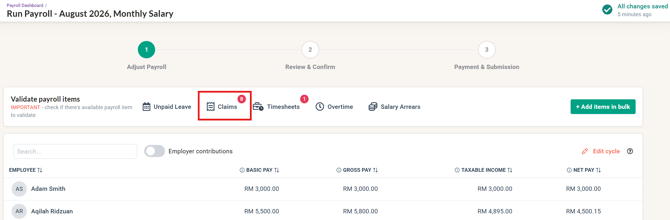
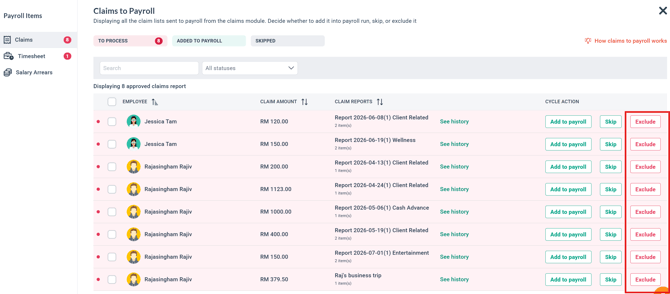
When a Payroll Officer clicks Exclude on an imported claim in brioHR Payroll process, the claim is permanently removed from payroll processing.
-
Behavior: Subsequent API pushes using the same
externalClaimReportIdwill returnalready-parkedand will not recreate the claim. -
Workaround: To resubmit an excluded claim, the third-party system must assign a new
externalClaimReportId.
Blocker 2: Queue Visibility Requirements
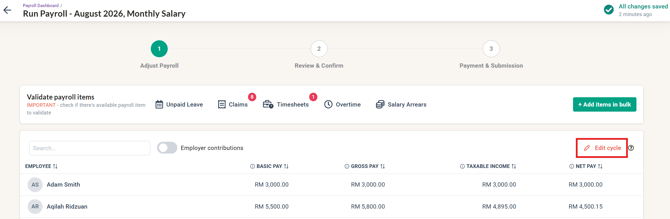
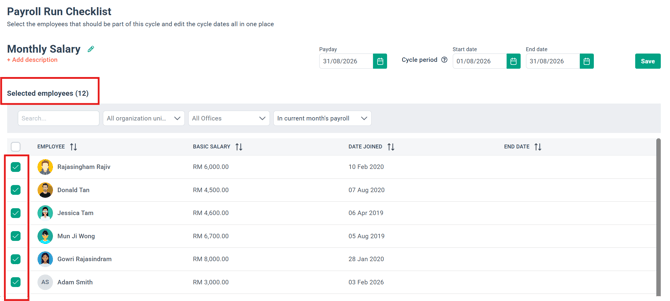
Claims parked via the API only appear in the Validate Payroll items tab if an active payroll cycle exists that includes the claimant employee. If the API returns 201 status: parked but the claim is invisible in the web portal, verify that a running payroll cycle covers the employee.
Blocker 3: Skip vs. Exclude UI Actions
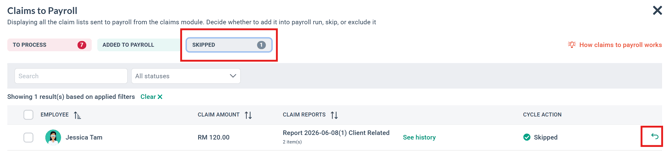
-
Skip: Deferring a claim moves it to the Skipped tab (with an
Undooption), allowing it to be included in a future cycle.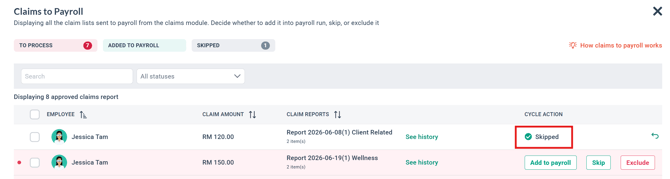
-
Exclude: Permanently excludes the claim and displays: "This claim was sent via API and cannot be sent back to payroll once excluded".
Blocker 4: Office Country Validation Scope
The API validates only payload-present fields. A separate office-country vs. payroll-center-country check is not performed because currency matching (TRANSFER_CLAIM_REPORT.UNMATCH_CURRENCY_BASE) inherently blocks cross-country mismatches.
Blocker 5: Recovering Overpayments / Salary Deductions via the API
The Claim Import API does not support negative claimableAmount values under any circumstance — the field rejects 0, negative numbers, and sub-cent decimals regardless of intended use (see Field Rules & Data Types). This means you cannot submit a negative amount against a Reimbursement item to deduct money from an employee's payslip (e.g., recovering a prior overpayment, or clawing back a staff purchase).
- Workaround: Ask the client's Payroll Admin to create a Cash Advance Settlement–type item in the employee's Payroll Center (Payroll Center Settings → Payroll Items), or reuse an existing one. This item type already behaves as a payroll deduction, so submitting a claim against it reduces the employee's payslip instead of adding to it.
- Submit the deduction using the same Claim Import API endpoint, with the Cash Advance Settlement item's label as
payrollItemandclaimableAmountsent as a positive number.
Example payload:
json
{
  "reports": [
    {
      "externalClaimReportId": "MESI-2026-09-010",
      "employeeEmail": "employee5active@yopmail.com",
      "reportName": "September claim deduction",
      "currency": "MYR",
      "claims": [
        {
          "externalClaimId": "MESI-2026-09-010-L1",
          "payrollItem": "Claims Deductions",
          "claimableAmount": 250.00,
          "taxAmount": 0,
          "description": "Staff purchase recovery",
          "transactAt": "2026-09-01"
        }
      ]
    }
  ]
}
Error Code & Troubleshooting Reference
All business rule failures return HTTP 400 Bad Request with per-report details in metadata.errors
| Error Code | HTTP Status | Cause | Resolution |
CLAIM_IMPORT_API.EMPLOYEE_NOT_FOUND |
400 |
No employee matches |
Verify employee email spelling in brioHR[cite: 1]. |
CLAIM_IMPORT_API.EMPLOYEE_AMBIGUOUS |
400 |
Multiple employees share the same email address[cite: 1]. |
Resolve duplicate emails in brioHR Core HR[cite: 1]. |
CLAIM_IMPORT_API.NO_PAYROLL_CENTER |
400 |
Employee exists but is not assigned to a Payroll Center[cite: 1]. |
Assign employee to a Payroll Center in brioHR[cite: 1]. |
CLAIM_IMPORT_API.PAYROLL_ITEM_NOT_FOUND |
400 |
No matching Reimbursement item in the Payroll Center[cite: 1]. |
Use |
CLAIM_IMPORT_API.PAYROLL_ITEM_AMBIGUOUS |
400 |
Multiple items normalize to the same name in the center[cite: 1]. |
Rename duplicate items in Payroll Center settings[cite: 1]. |
TRANSFER_CLAIM_REPORT.UNMATCH_CURRENCY_BASE |
400 |
Report |
Provide currency matching the employee's Payroll Center base currency. |
CLAIM_IMPORT_API.CONFLICT |
400 |
Re-sent |
Resend exact payload for retries, or use a new ID for updates. |
CLAIM_IMPORT_API.DUPLICATE_REPORT_ID_IN_BATCH |
400 |
Duplicate |
Ensure report IDs are unique within the batch array. |
CLAIM_IMPORT_API.INTEGRATION_NOT_CONNECTED |
400 |
Claim-to-payroll integration is disabled for the Payroll Center[cite: 1]. |
Contact brioHR Support to enable integration[cite: 1]. |
Code Examples & Response Payloads
Sample cURL Request
Bash
curl --location 'https://static.api.briohr.com/v2/api/external/claims/import' \
--header 'Authorization: Basic YWRtaW51c2VyOnBhc3N3b3JkMTIz' \
--header 'x-api-context-company: 627c63693329540009b1d0ff' \
--header 'x-resource-type: claim-import' \
--header 'Content-Type: application/json' \
--data '{
    "reports": [
        {
            "externalClaimReportId": "MESI-2026-07-001",
            "employeeEmail": "employee5active@yopmail.com",
            "reportName": "August Travel & Meal Claims",
            "currency": "MYR",
            "claims": [
                {
                    "externalClaimId": "MESI-2026-07-001-L1",
                    "payrollItem": "Expense Claims",
                    "claimableAmount": 120.50,
                    "taxAmount": 0,
                    "description": "Grab to client site",
                    "transactAt": "2026-07-15"
                },
                {
                    "externalClaimId": "MESI-2026-07-001-L2",
                    "payrollItem": "Expense Claims",
                    "claimableAmount": 45.00,
                    "taxAmount": 0,
                    "description": "Client lunch",
                    "transactAt": "2026-07-16"
                }
            ]
        }
    ]
}'


---

### Response Examples

#### 1. Success Response (`HTTP 201 Created`)

```json
[
    {
        "externalClaimReportId": "MESI-2026-07-001",
        "status": "parked"
    }
]


#### 2. Safe Retry Response (`HTTP 201 Created`)

```json
[
    {
        "externalClaimReportId": "MESI-2026-07-001",
        "status": "already-parked"
    }
]


#### 3. Schema Validation Error Response (`HTTP 400 Bad Request`)

```json
{
    "id": "0c2e7320-8a55-11f1-869b-15639df20a9d",
    "code": null,
    "type": "unhandled",
    "message": "Bad Request Exception",
    "metadata": [
        "0.currency must be one of the following values: MYR, SGD, EUR, USD, ...",
        "0.claims.0.claimableAmount must be a number with at most 2 decimal places",
        "0.claims.0.transactAt must be a valid ISO 8601 date string"
    ],
    "isBrioError": true
}


#### 4. Business Rule Error Response (`HTTP 400 Bad Request`)

```json
{
    "id": "ce3ff901-beb2-4130-ab9b-42bf78a19f95",
    "code": "U",
    "type": "user",
    "message": "",
    "metadata": {
        "errors": [
            {
                "resourceId": "MESI-2026-07-004",
                "resourceType": "claim-report",
                "error": [
                    {
                        "code": "CLAIM_IMPORT_API.EMPLOYEE_NOT_FOUND",
                        "variables": {
                            "metadata": {
                                "value": {
                                    "email": "nobody@nowhere.com"
                                },
                                "type": "object"
                            }
                        }
                    }
                ]
            },
            {
                "resourceId": "MESI-2026-07-005",
                "resourceType": "claim-report",
                "error": [
                    {
                        "code": "CLAIM_IMPORT_API.PAYROLL_ITEM_NOT_FOUND",
                        "variables": {
                            "metadata": {
                                "value": {
                                    "label": "Does Not Exist",
                                    "payrollCenterId": "627c636aed34fa000816bf84",
                                    "availableLabels": [
                                        "Expense Claims"
                                    ]
                                },
                                "type": "object"
                            }
                        }
                    }
                ]
            }
        ],
        "isSilent": true
    },
    "isBrioError": true
}


#### 5. Idempotency Conflict Error Response (`HTTP 400 Bad Request`)

```json
{
    "id": "2b6daa64-8cd9-48ff-99e5-ed0bca428430",
    "code": "CLAIM_IMPORT_API.CONFLICT",
    "type": "user",
    "message": "externalClaimReportId was already ingested with a different payload",
    "metadata": {
        "externalClaimReportId": "MESI-2026-07-002"
    },
    "isBrioError": true
}
Common Issues/FAQ
Q1: What should I do if an imported claim was excluded by mistake in brioHR Payroll?
Once a Payroll Officer excludes an imported claim in brioHR, it is permanently removed from processing and cannot be moved back to payroll. Re-pushing the request using the same externalClaimReportId will return an HTTP 201 status: already-parked response and will not recreate the claim in the queue. To resubmit an excluded claim, your system must send the request using a new, unique externalClaimReportId.
Q2: How can I find the correct payrollItem label to map claims? Is there an API endpoint to list them?
There is no separate endpoint for listing payroll items; issuing a GET request to /v2/api/external/payroll-items will return 404 Not Found. brioHR automatically tolerates minor variations in casing, leading/trailing whitespace, and singular/plural wording when matching labels. If an item label fails to match, the API returns an HTTP 400 error with the code CLAIM_IMPORT_API.PAYROLL_ITEM_NOT_FOUND, which includes an availableLabels array in the response metadata listing all valid reimbursement labels for that employee's Payroll Center.
Q3: The API returned HTTP 201 status: parked, but the claim is not visible in the Claims to Payroll queue. Why?
Pushed claims only appear in the Claims to Payroll queue for a payroll cycle that covers the claimant employee. If a claim was successfully accepted by the API but does not appear in the brioHR web interface, verify that an active payroll cycle including that employee is currently running.
Q4: What happens to a claim item if it was 'added to payroll' then deleted (under the employee's pay item list)?
A4: The claim item will go back to the 'Validate payroll items'> Claims tab. You can choose to add it back to payroll, skip, or exclude the item.
Q5: How do I deduct an amount from an employee's salary (e.g., recovering an overpayment) using the Claim Import API?
A5: Do not send a negative claimableAmount — the API rejects it. Instead, have the Payroll Admin create (or reuse) a Cash Advance Settlement–type payroll item in that employee's Payroll Center, then submit the amount as a positive number using that item's label as payrollItem. Cash Advance Settlement items already function as payroll deductions, so the amount is correctly subtracted from the payslip.
Related Articles
Managing Approved Claims in the Payroll Module
Ownership
By: Aqilah