![brioHR-logo-color.svg]](https://support.briohr.com/hubfs/brioHR-logo-color.svg)
Audience & Scope
Audience: HR and admin teams setting up brioHR for the first time
Module: Payroll Singapore
Country: Singapore
Pre-requisites: Implementation kick-off meeting with your Implementation Manager (IM) completed; the Company Payroll Info (SG) and Employee Payroll Data (SG) templates from your IM; Employee List loaded and verified (Profile & Dashboards)
This article is part of the Payroll Singapore data migration series. It follows the Payroll Singapore Data Migration Guide (PDF).
Company Payroll Info (SG)
💡 How to read the field tables
In the "Required" column, Compulsory means the template marks the field as compulsory, Fill in means the template asks for it, and If applicable means you only fill it in when it applies to you or your employee. The template says to leave any field blank if it isn't applicable. Fill in the Company Payroll Info template first, then the Employee Payroll Data template.
🔗 Related article
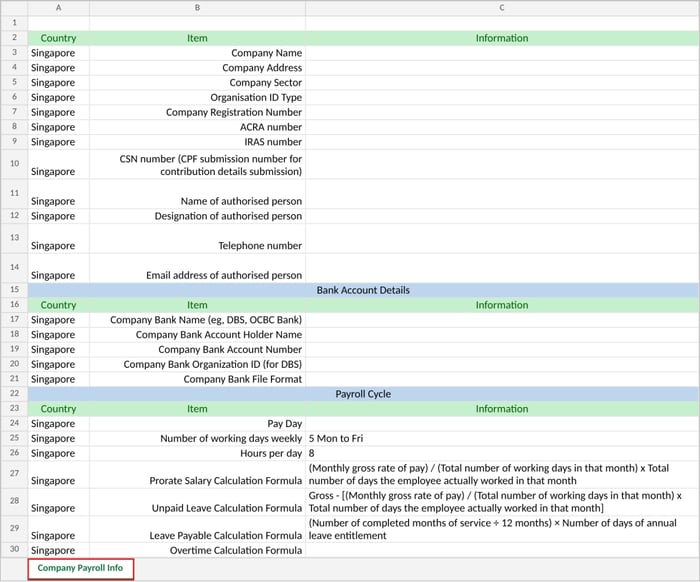
Open the Company Payroll Info tab. It has three parts, one below the other: company details, bank account details and payroll cycle. Fill in the Information column next to each item. Example of the Company Payroll Info tab:
Company details
| Field | Required | Notes |
|---|---|---|
| Company name | Fill in | |
| Company address | Fill in | |
| Company sector | Fill in | Choose from the dropdown: Manufacturing, Services, Construction, Process, Marine or Others. |
| Organisation ID type | Fill in | Choose from the dropdown: UEN (business registration number issued by ACRA), UEN (local company registration number issued by ACRA), ASGD (tax reference number assigned by IRAS), ITR (income tax reference number assigned by IRAS), or UENO (other unique entity number, e.g. a foreign company registration number). The template links to a short guide on how to check yours. |
| Company registration number | Fill in | |
| ACRA number | Fill in | |
| IRAS number | Fill in | |
| CSN number | Fill in | Your CPF submission number, used for contribution details submission. |
| Name of authorised person | Fill in | |
| Designation of authorised person | Fill in | Example: Payroll Manager. |
| Telephone number | Fill in | Of the authorised person. |
| Email address of authorised person | Fill in |
Company bank information
| Field | Required | Notes |
|---|---|---|
| Company bank name | Fill in | Example: DBS or OCBC Bank. Tell your IM immediately if your company bank is not available. |
| Company bank account holder name | Fill in | |
| Company bank account number | Fill in | |
| Company bank organisation ID (for DBS) | If applicable | Only if you bank with DBS. |
| Company bank file format | Fill in | The format of the bank file brioHR generates. Confirm with your IM. |
💡 Tip
Not sure of your company's bank details? Ask the person in charge of your company's bank account (for example your finance team or company PIC), or contact the bank directly. Check them carefully, because the bank file for salary payment is generated from these details.
Company pay day and calculation
🔗 Good to know
brioHR only processes payroll based on a full calendar month, from the first to the last day of the month. The pay day you choose will be the default date shown every time you run your monthly cycle. This data will be used if your bank files require a disbursement date before it can be generated.
| Field | Required | Notes |
|---|---|---|
| Pay day | Fill in | Choose from the dropdown, for example "Last day of the month" or "Monthly on the 5th". |
| Number of working days weekly | Fill in | Pre-filled as 5 (Mon to Fri). Change it if your company works different days. |
| Hours per day | Fill in | Pre-filled as 8. |
| Prorate salary calculation formula | Fill in | Pre-filled: monthly gross rate of pay, divided by the total number of working days in that month, multiplied by the number of days the employee actually worked. |
| Unpaid leave calculation formula | Fill in | Pre-filled: gross pay minus the prorated amount, using the same working-days formula. |
| Leave payable calculation formula | Fill in | Pre-filled: completed months of service divided by 12, multiplied by the annual leave entitlement in days. |
| Overtime calculation formula | Fill in | Blank in the template. Agree this with your IM, and fill it in. |
🔗 Related articles: how proration and company settings work
← Previous: What to Prepare Before Filling In Your Payroll Templates (Singapore Payroll Guide)
Next: How to Fill In the Employee Payroll Data Template (Singapore Payroll Guide) →
Back to Payroll Data Migration and Verification: Start Here (Singapore Payroll Guide)
Ownership
By: Aqilah