![brioHR-logo-color.svg]](https://support.briohr.com/hubfs/brioHR-logo-color.svg)
Introduction
brioHR supports the integration of Time and Attendance via API or SFTP.
If your company already has an attendance system and requires the data to be imported into brioHR for Time Attendance via API or SFTP, you will have to set up employee Time Attendance policies to support this. Only do this for policies where your employees clock in/out via third-party systems or external devices. Integration data is automatically added to their timesheet, and integration details can be viewed in the Integration Logs.
If you are using a Timetec device, learn more:
How to Link Timetec Device in brioHR Time and Attendance Module
IMPORTANT:
To enable this integration, you will need to contact our support team via email or live chat so we can provide the necessary access. Please contact us via:
- Email: support@briohr.com
- Live chat: Available 9 am - 6 pm (Kuala Lumpur working days)
Note: If you are still in the implementation stage, please reach out to your implementation manager for support.
Step-by-Step Guide: Access the Time Attendance Policy
Step 1 - Log In to brioHR Account
Log in to the brioHR account with your registered credentials.
Step 2 - Access the Time Attendance Policy
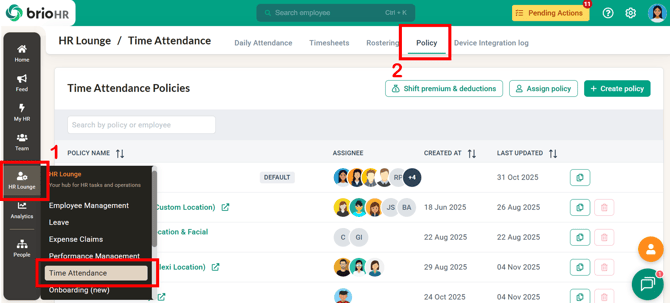
1. Go to HR Lounge > Time Attendance.
2. Navigate to Policy.
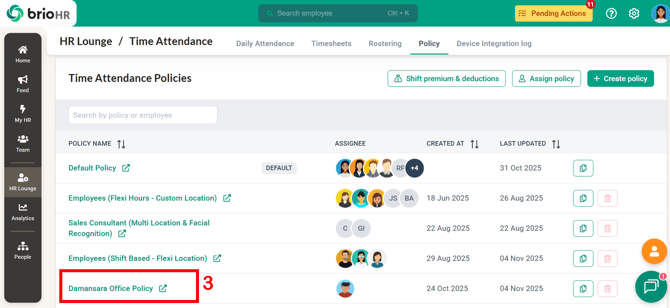
3. Open any policy that you would like to set up the integration.
Step-by-Step Guide: Set Up Integration
Step 1 - Enable Integration in Time Attendance Policy
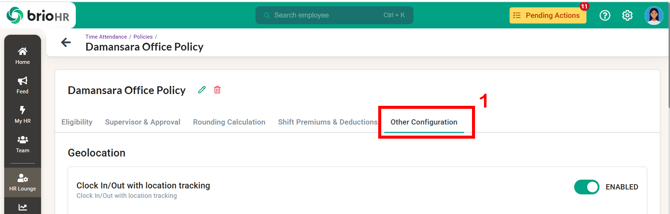
1. On the policy page, go to Other Configuration.
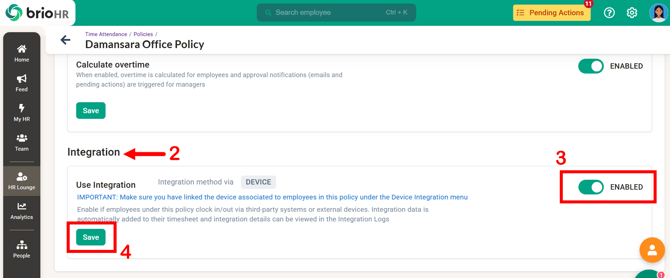
2. Scroll down to Integration.
3. Toggle ON the 'Use Integration' to enable it.
4. Click Save.
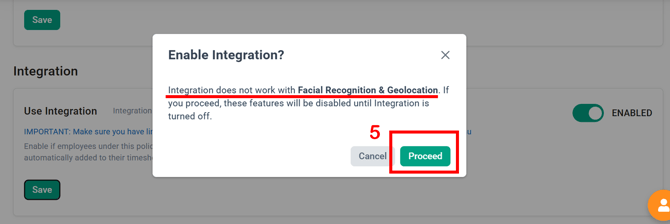
5. A confirmation message will appear - click Proceed to confirm.
NOTE:
You can enable the Hybrid Attendance option within a policy created with API or SFTP integration methods.
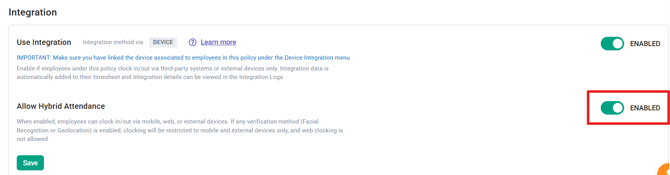
Example Scenario:
An employee may use the company’s attendance device (non-TimeTec) to Clock In and Clock Out while working from the office on one day. On another day, when attending an off-site customer visit or working remotely, the employee may not have access to the company device.
With the API or SFTP integration enhancement, the employee can instead perform their Clock In and Clock Out directly through the brioHR mobile application.
CAUTION:
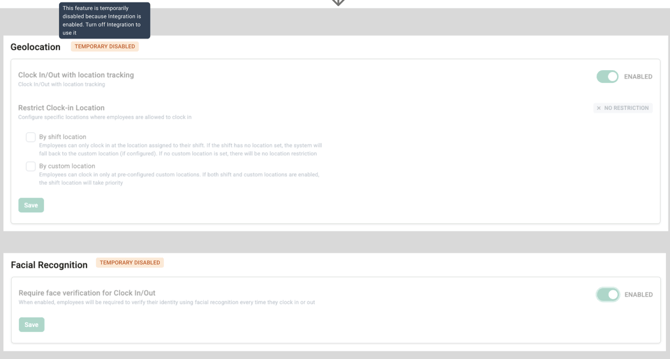
When integration is enabled, the Facial Recognition and Geolocation features in the policy will be automatically disabled.
Step 2 - Setting Up API or SFTP Integration
For guidance, refer to the articles below:
-
Import Employee Time Attendance Data (API Integration) for Clock-In and Clock-Out
- Import Employee Time Attendance Data (SFTP Integration) for Clock-In and Clock-Out
NOTE — Data Processing Strategy:
When setting up your SFTP or API integration, brioHR will configure it to process incoming clock data using either:
-
the Default (Full Action Log) strategy: your source system sends clean, correctly-labelled, correctly-ordered Clock-In/Clock-Out data, or
-
the first and last log strategy: your source system sends raw, unsorted clock data, and brioHR automatically determines each employee's actual first Clock-In and last Clock-Out per day.
Let our support team know which strategy you prefer when you request access for the integration.
Step 3 - Checking Time Attendance Integration Log
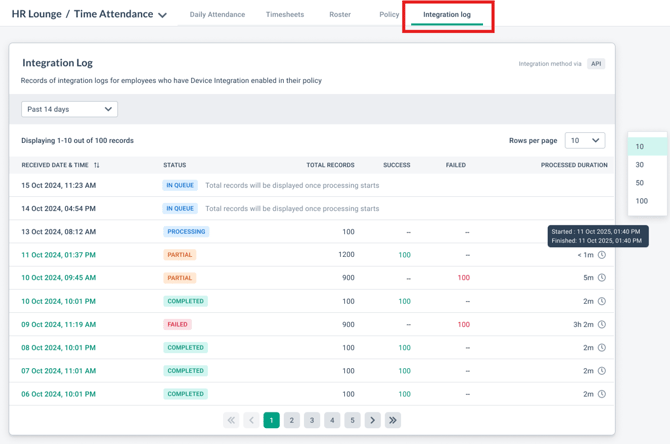
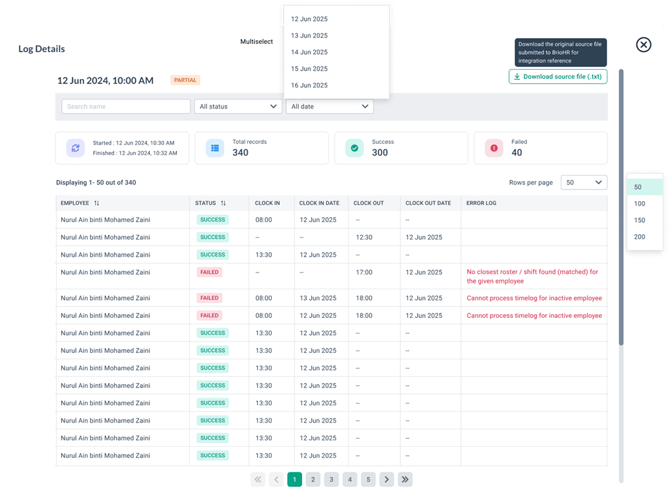
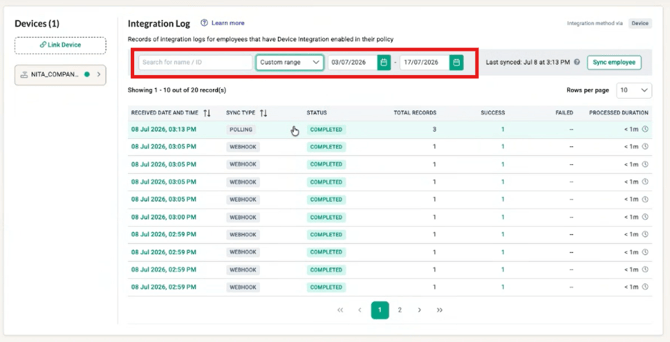
Once data has been imported, the integration data is automatically added to their timesheet, and integration details can be viewed in the Integration Logs.
TIP:
-
Use the name/employee ID filter to find specific employee records easily.
-
Select 'Custom range' from the time range dropdown to find logs from a specific date range.
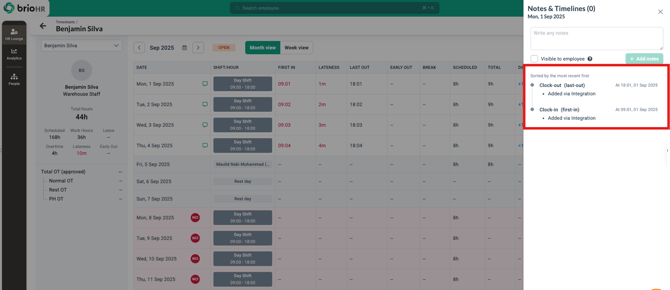
Details in employee timesheet will also reflect attendance added via integration.
LIMITATION:
brioHR is only able to process up to 45 days of backdated clock-in/out data. Any data sent for attendance records more than 45 days old will not be processed.
Frequently Asked Questions (FAQs)
1. Which Timetec device models are supported by brioHR?
Currently, brioHR supports the Timetec TC10 model for device integration.
2. Can I enable both device integration and facial recognition (brioHR mobile app) at the same time?
No. Once device integration is enabled, facial recognition and geolocation options (for mobile app time attendance) will be disabled as they are not compatible.
Ownership
Last Updated by: Aqilah